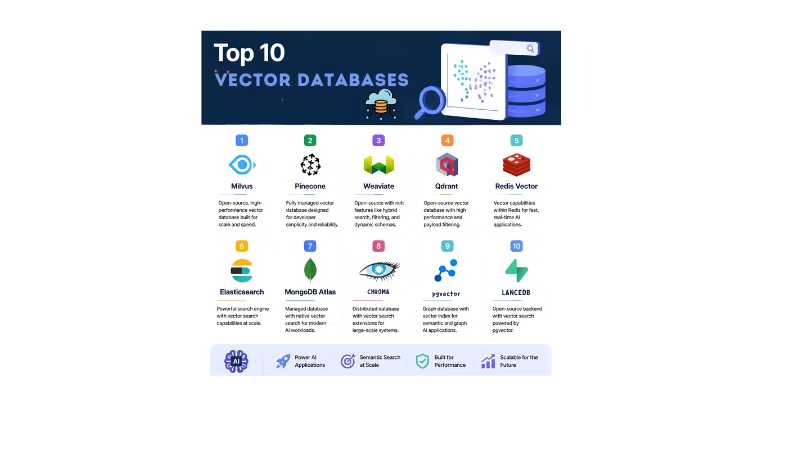
Top 10 Vector Databases for the AI Application are important topic for the developers. RAG (Retrieval-Augmented Generation), semantic search, and AI agents need efficient way to store and retrieve the vector embeddings.
Traditional databases are efficient for the structured data, but for AI applications need to search based on semantic similarities rather than exact keyword matches. AI Application uses the non-structured data.
Vector database solves this problem by storing embeddings and efficiently searching vectors and give the most relevant information.
In this guide, we will explore the Top 10 Vector Databases in 2026, key features, use cases, advantages, limitations.
Table of Contents
- What Is a Vector Database?
- Why Are Vector Databases Important for AI?
- How Do Vector Databases Work?
- Top 10 Vector Databases in 2026
- Vector Database Comparison
- Vector Databases for RAG and AI Agents
- Best Practices
- Frequently Asked Questions
- Conclusion
What Is a Vector Database?
A Vector database stores the information into the numeric representation which is called the embeddings. It is used for non-structural information.
An embeddings model converts the text, images, audio, or code into numerical representations.
For example:
“How may I help you.?”
|
Embedding Model
|
[0.21, -0.45, 0.78, 0.13, …]
|
Vector Database store these numerical information
When user asks a similar question again, the model converts the query into embeddings and searches for the nearest vectors. This enables semantic search.
Why Are Vector Databases Important for AI Applications?
Vector databases are important for modern AI applications because LLMs do not automatically have access to your private or constantly changing business data.
RAG application uses a vector database in the below workflow.
Documents
  |

Document divided into small chunks

  |

Embedding Generation

  |

Vector Storage

  |

Semantic Retrieval

  |

Relevant Context

  |

Large Language Model

  |

Generated Answer
For detail explanation, see our guide on RAG Architecture and Workflow for LLM Apps.
Vector databases are used for:
- RAG applications
- AI chatbots
- AI agents
- Personalization systems
- Semantic search
- Document search
- Code search
- Image search
- Knowledge bases
How Do Vector Databases Work?
The basic workflow is straightforward.
1. Convert Data into Embeddings
An embedding model converts data or information into embedding or called vectors
2. Store the Vectors
The vectors are stored together with metadata such as:
Document ID
Title
Category
Author
Created Date
Embedding
3. Convert the User Query
The user’s query is converted into an embedding using the same or compatible embedding model.
4. Perform Similarity Search
The vector database searches nearest embedding or vector
Common similarity metrics include:
- Cosine similarity
- Dot product
- Euclidean distance
5. Return Relevant Results
Relevant documents are return to the application and then these information can be provided to an LLM as context.
Top 10 Vector Databases in 2026
Here are the Top 10 Vector Databases worth considering for modern AI applications in 2026.
| Rank | Vector Database | Best For | Hosting | Open Source |
| 1 | Pinecone | Managed AI and RAG | Cloud | No |
| 2 | Qdrant | Fast vector search and filtering | Cloud / Self-hosted | Yes |
| 3 | Weaviate | Hybrid search and RAG | Cloud / Self-hosted | Yes |
| 4 | Milvus | Large-scale AI retrieval | Cloud / Self-hosted | Yes |
| 5 | pgvector | PostgreSQL applications | Self-hosted / Managed | Yes |
| 6 | Chroma | AI prototypes and developer apps | Local / Cloud | Yes |
| 7 | LanceDB | Embedded AI applications | Embedded / Cloud | Yes |
| 8 | Redis | Real-time vector search | Cloud / Self-hosted | Yes |
| 9 | Elasticsearch | Hybrid and enterprise search | Cloud / Self-hosted | Yes |
| 10 | MongoDB Vector Search | MongoDB-based AI applications | Cloud / Self-managed | Yes/Platform |
1. Pinecone.
Pinecone is specifically designed for the AI applications. It is mostly used for the RAG applications because developers do not need to manage the vector infrastructure.
Pinecone’s currently supports automatic indexing, fast retrieval, search capabilities.
Best For
- RAG Application
- AI multi-Agents
- Semantic search
- Large-scale applications
- Recommendation systems
Advantages
- Easy to integrate
- Automatic indexing
- Serverless architecture
- Scalable infrastructure
Best choice: Managed production AI applications.
2. Qdrant
Qdrant is open source vector database which is used for high performance semantic search.
One of the major advantages of Qdrant is filtering. It also supports dense vector, metadata payloads, hybrid search.
Best For
- RAG
- AI agents
- Filter-heavy semantic searches
- Performance-sensitive applications
Advantages
- Open source
- Strong filtering
- Hybrid search
- Dense and sparse vectors
- Self-hosting support
Best choice: Developers who want performance and control.
3. Weaviate
Weaviate is open source vector database with cloud capabilities. It provides hybrid search, backups, multi-tenancy, filtering and vectorizer integrations.
Best For
- RAG applications
- Semantic search
- Hybrid search
- AI applications requiring multiple retrieval strategies
Advantages
- Open source
- Hybrid search
- Built-in vectorization options
- Strong filtering
- Multi-tenancy
Best choice: RAG applications requiring hybrid and semantic search.
4. Milvus
Milvus is an open-source vector database built for the large scale vector or embedding search.
It supports deployments from local development to web scale applications and provide integration for semantic search, RAG, and for AI agents.
Milvus released the 3.0 in July 2026 , which introduced a lake native architecture that can index and retrieve data in object storage. It also supports retrieval capabilities with server side sorting, faceted search and multi vector functionality.
Best For
- Large-scale AI applications
- Enterprise search
- Advanced retrieval systems
- Billion-scale vector workloads
Advantages
- Highly scalable
- Open source
- Distributed architecture
- Strong indexing capabilities
- Modern lake-native capabilities
Best choice: Large-scale and enterprise AI retrieval and semantic search
5. pgvector
Pgvector brings vector similarities search into the PostgreSQL. This is useful when your application already using PostgreSQL.
pgvector supports exact and approximate nearest-neighbour search, HNSW, multiple distance metrics, sparse vectors, and hybrid search with PostgreSQL full-text search.
Best For
- Existing PostgreSQL applications
- Small-to-medium RAG applications
- Applications requiring relational and vector data together
Advantages
- PostgreSQL integration
- SQL support
- ACID transactions
- Joins
- Existing PostgreSQL ecosystem
- HNSW and IVFFlat
Best choice: Applications already using PostgreSQL.
6. Chroma
Chroma is an open-source database designed for retrieval workflows. It supports embedding, dense and sparse search, hybrid search, and full-text-search. Chroma also provides the cloud option for scalable deployments.
Best For
- RAG applications
- Local development
- AI coding and agent applications
Advantages
- Simple developer experience
- Open source
- Local development
- Python and TypeScript support
- Cloud option
Best choice: Developers building and testing AI applications quickly.
7. LanceDB
LanceDB is an embedded vector database for AI applications.
Best For
- Local AI applications
- Multimodal applications
- Prototypes
- Embedded AI systems
Advantages
- Embedded architecture
- Developer friendly
- Open source
- Useful for local AI workflows
Best choice: Embedded and developer-focused AI applications.
8. Redis
Redis can also be used for vector search through redis search. It supports vector indexes, KNN search, metadata filtering. Redis also supports multiple vector index approach like FLAT, HNSW and SVS-VAMANA.
Best For
- Real-time AI applications
- Semantic search
- Applications already using Redis
Advantages
- Very fast
- Real-time workloads
- Vector and traditional data
- Metadata filtering
Best choice: Real-time applications already using Redis.
9. Elasticsearch
Elasticsearch can also use for the vector database. It supports dense and sparse vectors, KNN search, semantic search, filters, aggregations and hybrid retrieval.
Elasticsearch especially useful when an application needs both traditional keyword search and semantic vector search.
Best For
- Enterprise search
- Hybrid search
- Semantic search
- Log and document search
- Existing Elasticsearch deployments
Advantages
- Keyword and vector search
- Powerful filtering
- Aggregations
- Mature search ecosystem
- Hybrid retrieval
Best choice: Enterprise applications needing both keyword and vector search.
10. MongoDB Vector Search
MongoDB Vector Search allows to store and search vectors alongside existing MongoDB application data.
It supports semantic search, full-text search, filtering, and RAG applications. MongoDB also provides automated embedding capabilities for some workflows.
Best For
- MongoDB applications
- AI-powered applications
- RAG
- Semantic search
- Agentic applications
Advantages
- MongoDB integration
- Vector and document data
- Semantic search
- Full-text search
- Filtering
Best choice: AI applications already built around MongoDB.
Vector Database Comparison
| Database | RAG Support | Hybrid Search | Self-Hosted | Large-Scale Workloads | Best For |
| Pinecone | Excellent | Excellent | No | Excellent | Managed AI |
| Qdrant | Excellent | Excellent | Yes | Very Good | Performance |
| Weaviate | Excellent | Excellent | Yes | Very Good | Hybrid RAG |
| Milvus | Excellent | Very Good | Yes | Excellent | Enterprise scale |
| pgvector | Excellent | Very Good | Yes | Good | PostgreSQL |
| Chroma | Very Good | Very Good | Yes | Good | Prototyping |
| LanceDB | Very Good | Good | Yes | Good | Embedded AI |
| Redis | Very Good | Very Good | Yes | Very Good | Real-time AI |
| Elasticsearch | Excellent | Excellent | Yes | Excellent | Enterprise search |
| MongoDB | Very Good | Very Good | Yes | Very Good | MongoDB apps |
Vector Databases for RAG and AI Agents
Vector databases are important part of the modern RAG applications. Below is the RAG workflow as a sequence of connected stages:
User Query
  |
Query Embedding
  |
Vector Database Retrieval
  |
Relevant Documents
  |
Context Assembly
  |
Large Language Model
  |
Generated Answer
AI agents can use a similar retrieval process before deciding what action to take:
User Request
  |
 AI Agent
  |
Knowledge Retrieval
  |
Vector Database
  |
Relevant Context
  |
Agent Reasoning
  |
Tool Execution or Final Response
Vector databases are useful for AI agents that need access for documentation, product information, customer data, or knowledge bases.
You can also combine vector databases with LangGraph when building stateful AI agents.
Frequently Asked Questions
What is the best vector database in 2026?
There is no universal winner. Pinecone is a strong choice for managed AI infrastructure, pgvector is attractive when PostgreSQL is already part of your stack, Qdrant is strong for performance and filtering, Weaviate is useful for hybrid search, and Milvus is designed for large-scale vector workloads.
Which vector database is best for RAG?
Pinecone, Qdrant, Weaviate, Milvus, pgvector, and Chroma can all be used for RAG. The best choice depends on scale, hosting requirements, search features, and existing infrastructure.
Is pgvector a vector database?
pgvector is a PostgreSQL extension that adds vector similarity search capabilities to PostgreSQL. It allows developers to store vectors alongside relational data and supports exact and approximate nearest-neighbor search.
Is Pinecone better than Qdrant?
Not necessarily. Pinecone is attractive when you want a fully managed service with minimal infrastructure management. Qdrant is attractive when you want open-source software, self-hosting, advanced filtering, and more infrastructure control.
What is the difference between a vector database and a traditional database?
Traditional databases primarily store structured data and commonly retrieve records using exact matches, indexes, and relational queries. Vector databases are optimized for similarity search over embeddings.
Can vector databases be used with AI agents?
Yes. AI agents can use vector databases to retrieve relevant knowledge before generating responses or deciding which tools to use.
Are vector databases required for RAG?
Not always. RAG requires a retrieval mechanism, but that mechanism does not have to be a dedicated vector database. PostgreSQL with pgvector, Elasticsearch, MongoDB, and other systems can also provide vector retrieval.
Which vector database is best for beginners?
Chroma and pgvector are good starting points for developers because they can be relatively simple to integrate into local or existing application environments.
Conclusion
Developers have more choices for building AI powered applications with Top 10 vector Databases. The most important lesson is that you should not select a vector database only because it appears at the top of a list.
Instead, evaluate your:
- Dataset size
- Query volume
- Latency requirements
- Search requirements
- Hosting model
- Existing infrastructure
- Security requirements
- Budget
- Long-term scaling plans
As RAG, semantic search, multimodal applications, and AI agents continue to evolve, understanding vector databases will remain an important skill for AI engineers in 2026 and beyond.