When AI agents perform the actions on the web applications then application become more attractive. Instead of navigating buttons, menus, and forms through the DOM, an AI agent can use structured tools by a web application. this is where WebMCP in angular comes in picture.
WebMCP provides the web API that allows web applications to expose their functionality ,actions, forms in a structured tools that AI agents can search and call based on the actions.
Angular provides experimental support for registering WebMCP tools within angular applications.
In this guide we will learn about the WebMCP , how WebMCP works with angular , how to create tools , how to connect tools with angular, and best practices to building AI ready angular applications.
Table of Contents
- What Is WebMCP?
- WebMCP in Angular
- How WebMCP Works
- Build a WebMCP Tool in Angular
- WebMCP with Angular Forms
- WebMCP vs Traditional AI Integration
- Best Practices
- FAQs
- Conclusion
What Is WebMCP?
WebMCP is an emerging web standard that allows web applications to expose their functionality , actions, as structured tools for AI agents.
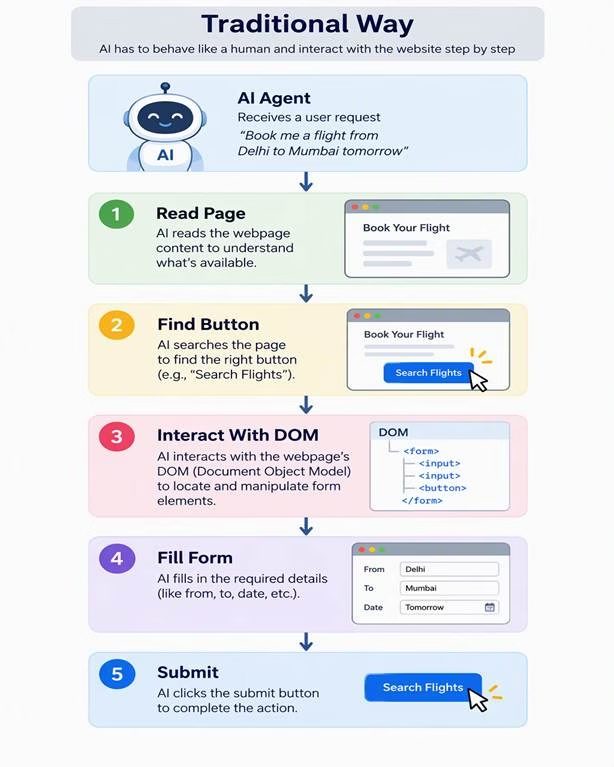
Without WebMCP AI agent interact with a website by:
With WebMCP, an application can expose a structured operation:
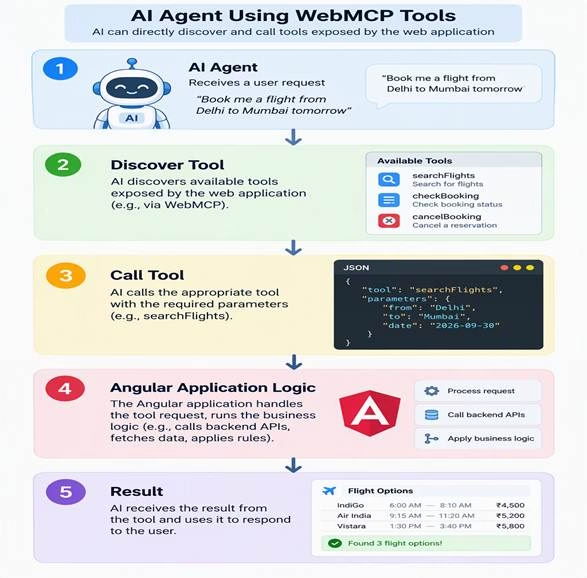
WebMCP takes a structured information like a json format in which we defined the name, description, input schema, and execution behaviour.
Using WebMCP approach reduce the need for an AI agent to understand visual interface before performing a supported operation.
Example
Imagine an e-commerce Angular application.
Instead of asking an AI agent to navigate:
Products → Search → Filter → Product → Add to Cart
the application could expose a tool such as:
searchProducts
The agent could provide:
{
"query": "wireless headphones",

  "maxResults": 5
}
The angular application can then execute its logic and return the result.
WebMCP in Angular
Angular currently provides experimental WebMCP support.
In angular documentation there is provideExperimentalWebMcpTools() function which is used to register the application-level tools. tools can be associated with forms, services, and routes.
WebMCP can connect these existing angular concepts such as dependency injection , services, with AI Agent interactions.
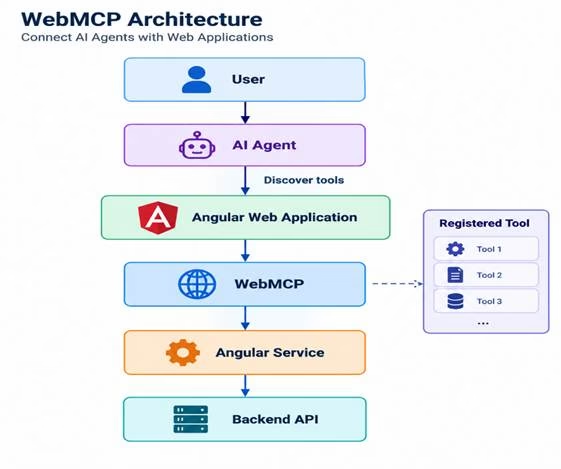
A simplified architecture looks like this:
                 AI Agent
                    |

                    v

              WebMCP Tool

                    |

                    v

             Angular Service

                    |

          +---------+---------+

          |                   |

          v                   v

       REST API           Application State

          |

          v

       Database
How WebMCP Works
A WebMCP-enabled applications provide the tools by registering them.
A tool generally contains:
- A unique name
- A human-readable title
- A description
- An input schema
- An execution function
- Optional annotations
The current WebMCP defines a ModelContext interface that applications can use to register the tools and manage it.
For example:
Tool
├── Name
├── Description
├── Input Schema
└── Execute Function
The AI agent can look up for the available tools and decide which tool should be use for the particular request.
WebMCP Architecture
Build a WebMCP Tool in Angular
Angular provides an experimental provideExperimentalWebMcpTools api for registering the tools.
Angular configuration looks like this:
import { inject, provideExperimentalWebMcpTools } from '@angular/core';
import { bootstrapApplication } from '@angular/platform-browser';
import { AppComponent } from './app.component';

bootstrapApplication(AppComponent, {
  providers: [
    provideExperimentalWebMcpTools([
      {
        name: 'greet',

        description: 'Returns a greeting message.',

        inputSchema: {

          type: 'object',

          properties: {}

        },
        execute: () => ({
          content: [
            {

              type: 'text',

              text: 'Hello from Angular WebMCP!'

            }

          ]

        })
      }
    ])
  ]
});
Add Parameters to an Angular WebMCP Tool
Real applications usually need input parameters.
Example – an Angular application could expose a product search tool.
provideExperimentalWebMcpTools([
{

    name: 'searchProducts',

    description: 'Searches products by keyword.',

    inputSchema: {

      type: 'object',

      properties: {

        query: {

          type: 'string',

          description: 'Product search keywords.'

        },

        maxResults: {

          type: 'number',

          description: 'Maximum number of products to return.'

        }

      },

      required: ['query'],

      additionalProperties: false

    },

    execute: ({ query, maxResults }) => {

      const limit = maxResults ?? 5;

      return {

        content: [

          {

            type: 'text',

            text: `Searching for "${query}" and returning up to ${limit} products.`

          }

        ]

      };

    }

  }

]);
The input schema describes the parameters that the AI agent can provide.
Connect WebMCP With an Angular Service
In angular application business logic should remain inside the angular services instead of being placed directly inside the webMCP tool.
For example:
WebMCP Tool
     |

ProductService

     |

HttpClient

     |

Backend API
A service could contain:
@Injectable({
providedIn: 'root'
})

export class ProductService {

   searchProducts(query: string) {
    return this.http.get('/api/products', {
      params: { query }
    });
  }
constructor(private http: HttpClient) {}
}
The WebMCP tool then call the product service to search the product.
This service implementation have advantage that business logic can be used by normal angular components and AI driven interactions.
             ProductService
              /          \

             /            \

      Angular UI       WebMCP Tool
WebMCP With Angular Routes
Angular also supports registering tools at the route level.
For example:
export const routes: Routes = [
{

path: ‘product’,
loadComponent: () => import('./dashboard'). then(m => m.productComponent),
    providers: [
      provideExperimentalWebMcpTools([

        {

          name: 'exportProduct',

          description: 'Exports product features.',

          inputSchema: {

            type: 'object',

            properties: {}

          },

          execute: () => ({

            content: [

              {

                type: 'text',

                text: 'Dashboard export started.'

              }

            ]

          })

        }

      ])

    ]
  }
];
This approach can be useful for large applications where different areas of the application expose different AI capabilities.
WebMCP With Angular Signal Forms
Angular provides capability to connect the WebMCP tools with signal forms.
Angular provides experimental provideExperimentalWebMcpForms() support that can connect Signal Forms with WebMCP.
For example:
import { signal } from '@angular/core';
import { form, required } from '@angular/forms/signals';

const model = signal({
  firstName: '',

  lastName: '',

  age: 0

});

const userForm = form(

  model, (field) => {

    required(field.firstName);

    required(field.lastName);

  },

  {

    experimentalWebMcpTool: {

      name: 'registerUser',

      description: 'Registers a new user.'

    },

    submission: {

      action: async (formValue) => {

        console.log(

          'User:',

          formValue().value()

        );

      }

    }

  }

);
Angular can derive the WebMCP tool from the form model and connect the tool with the form validation and submission action.
This creates an interesting pattern:
AI Agent
   |

WebMCP Tool

   |

Angular Signal Form

   |

Validation

   |

Submission

   |

Backend API
WebMCP vs Traditional AI Integration
WebMCP is different from traditional approaches for connecting AI with web applications.
| Approach | How it works | Typical challenge |
| DOM interaction | Agent interacts with visible UI | Can be fragile |
| REST API | AI application calls backend APIs | Requires separate AI integration |
| Function calling | Application defines functions for the model | Usually application-specific |
| MCP server | AI client connects to server-side tools | Requires MCP server infrastructure |
| WebMCP | Web application exposes client-side tools | Emerging browser technology |
WebMCP Use Cases in Angular
WebMCP can be useful for several types of Angular applications.
E-commerce
Possible tools include:
searchProducts
getProductDetails
addProductToCart
removeFromCart
Banking Applications
Potential capabilities could include:
getAccountBalance
findTransactions
downloadStatement
Admin Dashboards
An Angular dashboard could expose:
getSalesReport
exportReport
filterDashboard
getKpiSummary
Customer Support
Tools could include:
searchCustomer
getOrderStatus
createSupportTicket
Developer Portals
An internal Angular application could expose:
getBuildStatus
searchDocumentation
getDeploymentStatus
WebMCP Best Practices
1. Use Clear Tool Names
Prefer:
searchProducts
getOrderStatus
createSupportTicket
over vague names such as:
doAction
processData
runTask
2. Validate Tool Inputs
AI agent will not always provide the valid data.
Angular’s WebMCP documentation specifically recommends runtime validation because the provided schema does not itself guarantee that execution inputs match the expected types.
3. Keep Tools Small
A Tool should perform only one operation so that it will be clear and concise .
Instead of:
manageCustomer()
consider:
getCustomer()
updateCustomer()
createSupportTicket()
4. Avoid Duplicate Tool Names
WebMCP requires unique tool names. Angular notes that duplicate registrations can cause runtime errors.
5. Protect Sensitive Operations
Reading information and modifying information are different risk levels.
For example:
getOrderStatus()
is different from:
cancelOrder()
Operations that change data should have appropriate authorization and, where necessary, explicit user confirmation.
Frequently Asked Questions
What is WebMCP in Angular?
WebMCP in Angular allows an Angular application to expose structured application capabilities as tools that AI agents can discover and invoke. Angular currently provides experimental WebMCP support.
Is WebMCP the same as MCP?
They are related but not identical. MCP commonly refers to the broader Model Context Protocol ecosystem, while WebMCP is a web-focused API for exposing application functionality to agents.
Can Angular forms work with WebMCP?
Yes. Angular provides experimental support for connecting Signal Forms with WebMCP tools and deriving tool input information from the form model.
Is WebMCP production-ready?
WebMCP is still an emerging technology. The current specification is a draft, and Angular’s implementation is experimental, so developers should expect API and specification changes.
Why use WebMCP instead of DOM automation?
WebMCP allows an application to expose structured tools directly, which can reduce an agent’s dependence on interpreting and manipulating the application’s DOM.
Conclusion
WebMCP in Angular is growing over the time for building AI-ready web application.
Instead of an AI agent to understand the every button , forms, routes structure, angular application can expose the well defined structured tools. These tools can connect to the angular services, routes, forms, and with backend APIs.
However Angular provides the webMCP with experimental feature so developer should use carefully in angular applications.
As browser-based AI capabilities evolve, exposing structured application tools could become an important part of how websites and AI agents work together.