
Top 10 Node.js Tools are important for developers building modern web applications, APIs, and microservices, real time systems in 2026.
Node.js provides a runtime environment to execute JavaScript outside the browser. Node.js runs on the server side. Developers also need frameworks, package managers, API platforms, database libraries and development utilities.
The Node.js ecosystem includes tools such as npm, pnpm, Express.js , NestJS, TypeScript, Docker, Fastify etc.
In this guide , we will explore the Top 10 Node.js Tools in 2026, their use cases, advantages, limitations.
Table of Contents
- What Is Node.js?
- Why Are Node.js Tools Important?
- How Does the Node.js Ecosystem Work?
- Top 10 Node.js Tools in 2026
- Node.js Tools Comparison
- How to Choose the Right Node.js Tool
- Node.js Tools for APIs and Full-Stack Applications
- Best Practices
- Frequently Asked Questions
- Conclusion
What Is Node.js?
It is an open-source, cross platform Javascript runtime environment that allow developers to run JavaScript on servers, command-line tools , desktop applications and scripts. It is built on the V8 engine
A Node.js application works like this:
     JavaScript or TypeScript Code
              |
     Node.js Runtime Environment
              |
       V8 JavaScript Engine
              |
          Server
Node.js uses an event driven , non-blocking I/O model. This makes it useful for applications that handle many parallel process, such as APIs , chat applications, streaming platforms, and real-time systems. Node js is called non-blocking because it can run multiple thread process and main thread will be free to execute the task.
Node.js is commonly used for:
- REST APIs
- GraphQL APIs
- Microservices
- Real-time applications
- Web servers
- AI application backends
Why Are Node.js Tools Important for Developers?
Node.js tools help developers to build, test , deploy the applications more effectively.
A modern Node.js development workflow often includes the following stages:
Project Initialization and structure
   |
Package Installation using npm or pnpm, or yarn
   |
Application Development
   |
Testing and Validation
   |
Build and Optimization
   |
Deployment
   |
Monitoring and Maintenance
How Does the Node.js Ecosystem Work?
The Node.js ecosystem is built around several connected components.
1. Runtime
It allows to execute JavaScript and TypeScript on the server side.
2. Package Manager
Package Manager installs the dependencies, libraries and manages it for the application.
3. Framework
A framework provides structure and supporting libraries for building APIs, web applications and microservices.
4. Development Language
Node.js applications use typescript to add static typing and improve maintainability.
5. Testing Tools
Testing tools helps to validate the application behaviour via unit testing, integration testing , end to end and performance testing.
6. Deployment Tools
Deployment tools package, run, scale, and monitor Node.js applications.
A typical project may include:
Node.js Runtime Environment
  |

Package Manage installer

  |

Framework

  |

TypeScript

  |

Testing Tools

  |

Cloud Platform

  |

Monitoring and Logging
Top 10 Node.js Tools in 2026
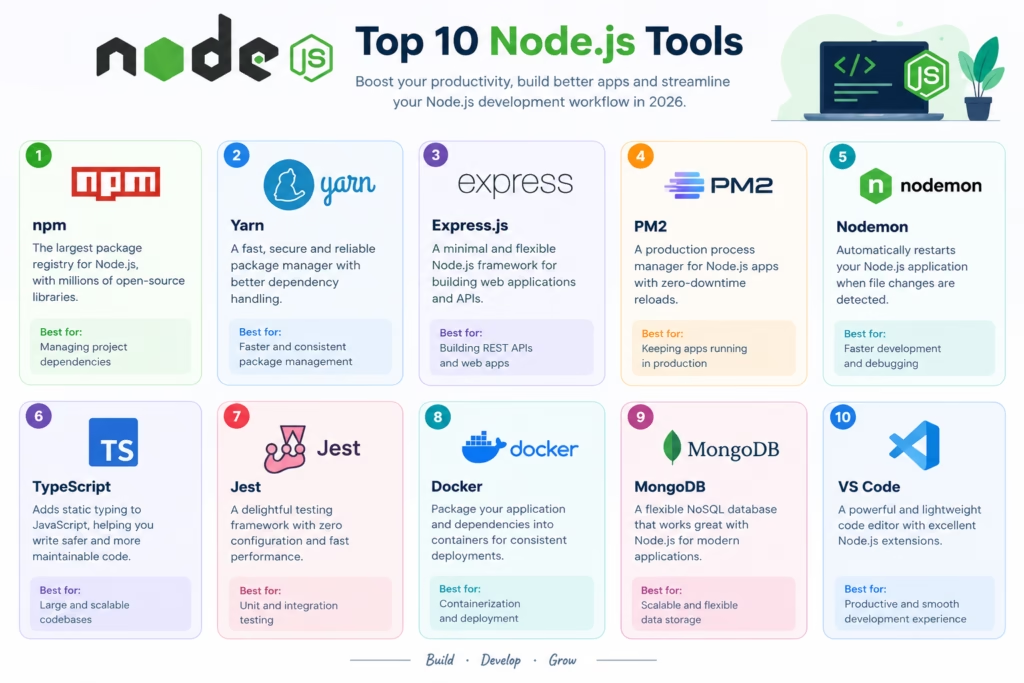
1. Node.js
Node.js is the modern server-side javascript ecosystem. It provides the runtime environment which allows to run JavaScript into the server. It has many built-in modules for HTTP server, filesystem, stream, networking and process.
Best For
- Backend applications
- REST APIs
- Real-time systems
- Microservices
Advantages
- Cross-platform support
- Strong community
- Non-blocking I/O
- Excellent support for real-time applications
- Faster to fetch the data from Database
Limitation
CPU workloads may require the worker threads , background jobs to avoid blocking the event loop or main thread.
2. npm
NPM is the package manager for node.js application and one of the most widely used package registry in the world. It allows to install the dependencies, manage project scripts, and define the reproducible application environment through files such as package.json and package lock file.
Best For
- Installing Node.js packages
- Managing dependencies
- Publishing libraries
- Running project scripts
Advantages
- Included with Node.js
- Large package registry
- Strong documentation
Limitation
Large project might be taking time to install the dependencies.
3. pnpm
pnmp is a fast package manager to reduce the disk usage and improve the installation performance.
It uses a content-addressable store and links packages into projects instead of copying the same dependencies repeatedly.
Best For
- Monorepos
- Large JavaScript projects
- Fast dependency installation
- Efficient disk usage
Advantages
- Fast installation
- Efficient disk storage
- Strong monorepo support
- Strict dependency management
Limitation
Some teams may need to check the dependency structure when migrating from npm or older project structures.
4. Express.js
Express.js is a lightweight web framework for node.js applications. It provides the routing, middleware , request handling , response handling and simple foundation for building APIs and web servers
Best For
- REST APIs
- Small and medium-sized applications
- Prototypes
Advantages
- Simple API
- Strong community
- middleware support
- Easy to learn
- Flexible architecture
Limitation
Express.js provides fewer built-in architectural conventions than more structured frameworks. Large applications may require teams to define their own project organization.
5. NestJS
NestJS is a structured node.js framework designed for scalable server-side applications.
It uses typescript and provides the module structure , controllers, providers, dependency injection, pipes, interceptor, guards.
Best For
- Enterprise applications
- Large APIs
- Microservices
- Structured backend systems
Advantages
- Strong architecture
- TypeScript support
- Dependency injection
- Modular design
- Support for REST, GraphQL, WebSockets, and microservices
Limitation
NestJS has more concepts and conventions than lightweight frameworks which can create a slow learning curve for beginners.
6. Fastify
Fastify is high-performance web framework which improves the speed and developer productivity. It provides serialization, plugins, hooks, logging and typescript integration.
Best For
- High-performance APIs
- Microservices
- Applications requiring schema validation
Advantages
- High performance
- Low overhead
- Plugin architecture
- JSON schema support
- Strong TypeScript compatibility
Limitation
Its ecosystem is smaller than Express.js, and developers may need to learn Fastify-specific patterns and plugins.
7. TypeScript
Typescript is strongly typed programming language that builds on JavaScript.
It is mostly used in node.js applications because it detects error earlier , define interfaces, and maintain large codebases.
Best For
- Large backend applications
- Enterprise systems
- Shared frontend and backend types
- API contracts
Advantages
- Static type checking
- Better editor support
- Improved refactoring
- Strong ecosystem integration
- Excellent support for modern Node.js frameworks
Limitation
TypeScript introduces a compilation or transformation step and requires developers to understand type systems, configuration, and build workflows.
8. Vitest
It is modern testing framework which is built for fast unit and integration testing.
It provides mocking, coverage, watch mode, and typescript support. It is mostly used in projects that already use modern JavaScript tooling.
Best For
- Unit testing
- Integration testing
- TypeScript projects
- Modern JavaScript applications
Advantages
- Fast test execution
- TypeScript support
- Mocking utilities
- Watch mode
- Coverage support
Limitation
Teams migrating from older testing systems may need to update configuration, mocks, and test conventions.
9. Playwright
Playwright is an end-to-end testing framework for web applications. It supports firefox, webkit, browser automation, parallel execution , tracing, video recording and screenshots.
Best For
- End-to-end testing
- Browser automation
- Cross-browser testing
- Regression testing
Advantages
- Cross-browser support
- Reliable browser automation
- Parallel test execution
- Debugging and tracing tools
- Network mocking
- Strong CI/CD support
Limitation
End-to-end tests can require more time, infrastructure, and maintenance than unit tests.
10. Bun
Bun is modern JavaScript runtime and toolkit that includes runtime, package manager, test runner, and bundler. It is designed for speed and aims to provide an alternative to several separate JavaScript development tools
Best For
- Fast local development
- JavaScript and TypeScript applications
- Package installation
- Testing
- Lightweight backend services
- Developer experimentation
Advantages
- Fast startup
- Built-in package manager
- Built-in test runner
- Built-in bundler
- TypeScript support
- Unified developer experience
Limitation
Although compatibility continues to improve, some Node.js packages, native modules, and production environments may still require compatibility testing.
Node.js Tools Comparison
Choosing between the Top 10 Node.js Tools depends on your project requirements.
| Tool | Primary Purpose | Performance | Learning Curve | Best For |
| Node.js | JavaScript runtime | Excellent | Moderate | Backend applications |
| npm | Package management | Good | Low | Standard projects |
| pnpm | Dependency management | Excellent | Low to Moderate | Monorepos |
| Express.js | Web framework | Very Good | Low | Flexible APIs |
| NestJS | Structured framework | Very Good | Moderate | Enterprise backends |
| Fastify | High-performance framework | Excellent | Moderate | Fast APIs |
| TypeScript | Typed development | Very Good | Moderate | Large codebases |
| Vitest | Unit and integration testing | Excellent | Low to Moderate | Modern testing |
| Playwright | End-to-end testing | Very Good | Moderate | Browser automation |
| Bun | Runtime and toolkit | Excellent | Low to Moderate | Fast development |
Node.js Tools for APIs and Full-Stack Applications
Node.js tools are commonly combined to build complete web applications.
A typical backend workflow may look like this:
Client Request
  |

Node.js Runtime

  |

Express.js, NestJS, or Fastify

  |

Authentication and Validation

  |

Business Logic

  |

Database or External API

  |

JSON Response
A full-stack development workflow may include:
Frontend Application
  |

API Layer

  |

Node.js Backend

  |

Database

  |

Background Jobs

  |

Monitoring and Deployment
A typical AI backend may look like this:
User Request
|
Node.js API
|
Authentication and Validation
|
AI Orchestration Layer
|
Model or Retrieval Service
|
Database or Vector Search
|
Generated Response
Node.js is useful for AI applications because it provides APIs, streaming response, websockets , and JavaScript-based full stack development.
Best Practices for Using Node.js Tools
Follow these practices when building production Node.js applications.
Use a Consistent Package Manager
Choose npm, pnpm, or another supported package manager and standardize it across local development and CI/CD.
Lock Dependencies
Commit your lockfile to ensure reproducible installations.
Use TypeScript for Complex Applications
TypeScript can improve maintainability, refactoring, and API contract management.
Validate Input
Use schema validation for request bodies, query parameters, environment variables, and external API responses.
Handle Errors Consistently
Create centralized error handling and return predictable responses from APIs.
Protect Secrets
Do not hard-code API keys, database credentials, or private tokens in source code.
Monitor the Event Loop
Avoid blocking operations and move CPU-intensive work to worker threads, queues, or separate services when necessary.
Keep Dependencies Updated
Regularly review security advisories, outdated packages, and transitive dependencies.
Optimize Production Builds
Use appropriate build, logging, caching, compression, and deployment strategies for production environments.
Frequently Asked Questions
What are the best Node.js tools in 2026?
The best tools depend on your project. Node.js is the core runtime, npm and pnpm manage dependencies, Express.js and Fastify are useful for APIs, NestJS is strong for structured backends, TypeScript improves maintainability, Vitest and Playwright support testing, and Bun provides an integrated JavaScript runtime and toolkit.
Which Node.js framework is best for APIs?
Express.js is a strong choice for simple and flexible APIs. Fastify is attractive for performance-sensitive services, while NestJS is better suited to structured and enterprise-scale applications.
Is Express.js still useful in 2026?
Yes. Express.js remains widely used because it is lightweight, mature, flexible, and supported by a large ecosystem. However, teams should evaluate newer frameworks when they need built-in schemas, stronger conventions, or specialized performance features.
Is NestJS better than Express.js?
Neither is universally better. NestJS provides more structure, dependency injection, and built-in architectural patterns. Express.js is simpler and more flexible. The right choice depends on project size, team preferences, and maintenance requirements.
Should I use npm or pnpm?
npm is a reliable default with broad compatibility. pnpm is attractive for large projects and monorepos because it can improve installation speed and reduce disk usage.
Is TypeScript required for Node.js?
No. Node.js applications can be written in JavaScript. However, TypeScript is often beneficial for large applications, shared codebases, complex APIs, and teams that want stronger type safety.
Is Bun a replacement for Node.js?
Bun can replace Node.js for some applications, but compatibility should be tested carefully. Node.js remains the safer choice when maximum ecosystem compatibility and production maturity are priorities.
Which testing tool is best for Node.js?
Vitest is a strong option for unit and integration testing, while Playwright is well suited for end-to-end browser testing. Many production teams use both.
Can Node.js be used for AI applications?
Yes. Node.js can power AI APIs, streaming interfaces, agent workflows, RAG applications, automation systems, and integrations with model providers, databases, and vector search platforms.
Is Node.js suitable for large-scale applications?
Yes. Node.js is used for large-scale applications, but performance and reliability depend on architecture, caching, database design, horizontal scaling, observability, and proper handling of CPU-intensive workloads.
Conclusion
Node.js is the base for server side JavaScript , while npm or pnpm simplify the dependency management. Express.js provides the flexible architecture for APIs , fastify improve the performance and NestJS offers structure for the enterprise and production applications
Before select any tools , you should evaluate your:
- Project size
- Performance requirements
- Architecture
- Type safety needs
- Ecosystem compatibility
- Testing requirements
- Deployment model
- Security requirements
- Long-term maintenance plans
As APIs, real-time applications, full-stack platforms, AI systems, and cloud-native services continue to evolve, understanding the Node.js ecosystem will remain an important skill for developers in 2026 and beyond.