In Modern react applications there are many tools that we can use for the state management and data fetching solutions. But two of the most discussed tools in react are redux toolkit and TanStack Query.
Redux Toolkit vs TanStack Query serve different purposes, and both can be use in same application based on the application complexity and requirements.
In this guide, we will understand the differences, use cases, advantages and best practices of the redux toolkit and TanStack Query. If you are building react application and want to know which tool to choose, this guide will help you.
What Is Redux Toolkit?
Redux Toolkit (RTK) is the official, recommended to use the redux logic efficiently. It helps to reduce the boilerplate code and providing built-in features for creating stores, reducers, actions. It’s followed the modular architecture to simplify state management of the application
Redux Toolkit is primarily designed for managing client-side application state.
Common examples include:
- Authentication state
- Theme settings data
- Feature toggle data
- User preferences and filter data
- Dashboard filter
What Is TanStack Query?
TanStack Query is a powerful open source state management library designed specifically for server-state management. It is formerly knows as React Query. Redux Toolkit is used for client side state but TanStack Query is responsible for server data.
It helps developers:
- Fetch API data
- Cache responses
- Synchronize server state
- Refetch stale data
- Manage loading and error states
- Improve the performance of the applications (use infinite scroll, paginations)
Examples include:
- Product listings
- User profiles
- Analytics dashboards
- Orders and transactions
- Search results
Redux Toolkit vs TanStack Query: Understanding the Core Difference
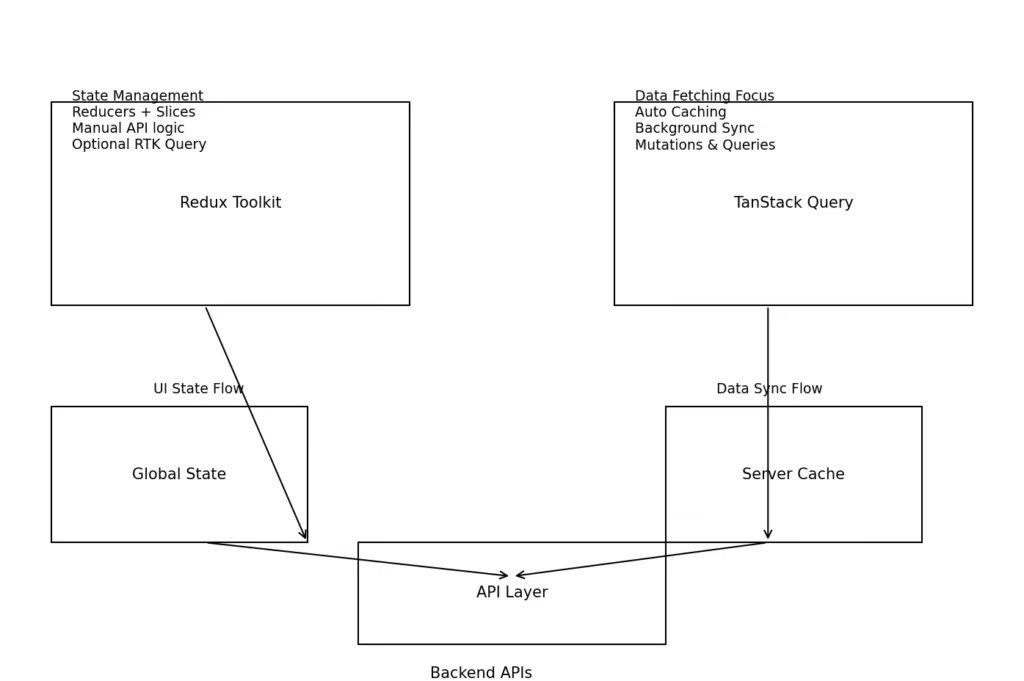
The easiest way to understand the difference is:
Redux Toolkit Manages Client State
Client state is data owned by your application.
Examples:
- Current theme
- Logged-in user status
- Sidebar visibility
- Cart items
- Toggle feature
TanStack Query Manages Server State
Server state is data owned by the backend or api data.
Examples:
- Product listing
- Customer information
- Reports
- Analytics
1. State Management Architecture
Redux Toolkit
Redux Toolkit uses a centralized store for application
Benefits include:
- Easy debugging
- Centralized data flow
- Excellent DevTools support
- Excellent community support
- Modular architecture
Although developers need to manually store / manage API states.
TanStack Query
TanStack Query uses a cache-first architecture.
Benefits include:
- Caching feature
- Automatic synchronization of the state
- Background updates
- Request deduplication
If Api is too much usages in application then this TanStack Query will provides better performance.
2. API Data Fetching
Redux Toolkit handle asynchronous actions using the createAsyncThunk. Although effective, it requires additional setup and boilerplate code setup.
TanStack Query simplifies API integration significantly. It automatically handle the asynchronous operations.
Features included by default:
- Loading states
- Error handling
- Refetching
- Retry mechanisms
- Cache management
Developers can focus on business logic instead of managing network requests. With the help of this TanStack Query developer can more focus on the business logic instead of the network request.
3. Caching Capabilities
Caching helps to reduce the Api call until data is not updated. So, it will improve the web application performance.
Redux Toolkit
We need to implement caching manually in redux toolkit.
Challenges include:
- Cache invalidation
- Duplicate requests
- Data freshness
TanStack Query
Caching is one of its strongest features.
Built-in features include:
- Query caching
- Stale-while-revalidate strategy
- Automatic updates
- Optimistic updates
- Synchronous updates data
Applications can deliver a much faster user experience with minimal configuration and setup.
4. Developer Experience
Developers need to understand the feature and working of the reducers ,actions, how update the store using action dispatch. Although it improved the less code setup and configuration
Advantages:
- Less boilerplate code
- Better TypeScript community support
- Easier configuration setup of the store
TanStack Query offers a simpler mental model. It has minimal boilerplate code setup.
Advantages:
- Quick setup
- Minimal boilerplate code
- Built-in API state handling
- Automatic cache management
5. Performance Comparison
For every react applications performance is the critical part.
Redux Toolkit
Performance depends on:
- State management and normalization
- Memoized selectors
- Store architecture
TanStack Query
Performance benefits include:
- Reduced API calls
- Smart caching
- Background synchronization and updates data
- Automatic request deduplication
Applications performance improved with this feature.
6. Scalability
Redux Toolkit
Ideal for:
- Enterprise applications
- Complex workflows
- Shared application state
TanStack Query
Ideal for:
- SaaS platforms
- API-heavy applications
- Real-time dashboards
- Analytics applications
7. Learning Curve
Redux Toolkit
Developers must understand:
- Store
- Reducers
- Actions
- Middleware
- Async workflows
TanStack Query
Developers mainly learn:
- Queries
- Mutations
- Query Keys
- Cache Invalidation
Can Redux Toolkit and TanStack Query Work Together?
Yes we can use both together in react applications.
Use Redux Toolkit For
- Authentication
- UI state
- Theme preferences
- Shopping carts
- Feature flags
Use TanStack Query For
- Product APIs
- User profiles
- Search results
- Orders
- Dashboard analytics
This approach creates a clean separation between application state and server state.
Redux Toolkit vs TanStack Query Comparison Table
| Feature | Redux Toolkit | TanStack Query | |
| Client State | Excellent | Limited | |
| Server State | Good | Excellent | |
| API Fetching | Good | Excellent | |
| Caching | Manual | Built-in | |
| Background Refetching | Limited | Excellent | |
| Learning Curve | Medium | Easier | |
| Scalability | Excellent | Excellent | |
| Performance | Excellent | Excellent |
Frequently Asked Questions
Is TanStack Query replacing Redux Toolkit?
No. TanStack Query focuses on server-state management, while Redux Toolkit manages client-side application state. They solve different problems.
Which is better for API calls?
TanStack Query is generally better for API calls because it includes caching, retries, refetching, and error handling out of the box.
Can Redux Toolkit and TanStack Query be used together?
Yes. Many enterprise React applications use Redux Toolkit for application state and TanStack Query for server state.
Is Redux Toolkit still relevant in 2026?
Absolutely. Redux Toolkit remains one of the most widely adopted state management solutions for React applications.
Is RTK Query better than TanStack Query?
RTK Query is an excellent solution for teams already using Redux Toolkit. However, TanStack Query offers more advanced caching and flexibility for server-state management.
Which tool has better performance?
For server data and API-heavy applications, TanStack Query usually provides better performance because of its intelligent caching and synchronization features.
Conclusion
Many developers compare Redux toolkit vs TanStack Query That which one is best to use in react application . but in reality these tools have different purpose and usages. Even we can use both tools in same application
Redux Toolkit manage the client-side application state, centralized data store, and strong debugging capabilities.
TanStack Query manage server-state, advanced caching, automatic synchronization, error and loading state, background refetching, and simplified API handling.
For most modern React applications, good approach is often to use both tools together. Redux Toolkit can manage like authentication, UI preferences, theme settings, while TanStack Query handles API communication and server data.
By understanding the strengths of each tool, developers can build faster, more scalable, and maintainable React applications. Both tools is valuable for the front end developers.
[…] a centralized store for handling the state. Modern react applications uses the redux using the Redux Toolkit. Redux toolkit is lightweight configuration and reduce the boilerplate code for […]