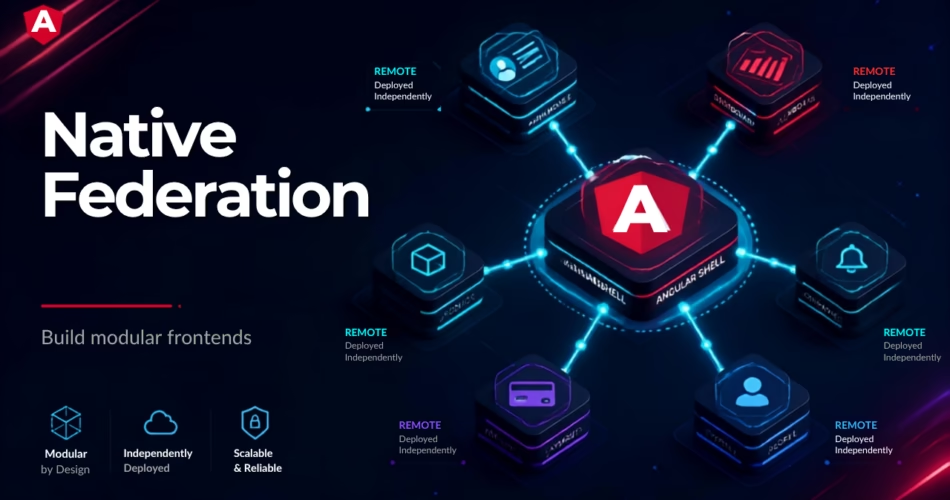
Modern enterprise application becomes difficult to maintain a large codebase. Micro frontends solve this problem by allowing multiple teams can work together, build, and deploy independently.
Webpack Module federation has traditionally one of the most popular for implementing angular Micro Frontends. However modern angular application now using the esbuild-based application builder, which makes Native federation alternative.
Native Federation also follow the same approach as webpack module federation, but it uses the browser native technologies such as ES modules and imports maps. It is not dependent on the webpack module federation.
Table of Contents:
- What is Native Federation
- How Native Federation works
- Native Federation vs Module Federation
- Native Federation architecture
- How to implement Native Federation in Angular
- Host and Remote configuration
- Lazy loading remote applications
- Sharing dependencies
- Dynamic federation manifests
- Production deployment
- Common challenges
- Best practices
What Is Native Federation in Angular?
Native federation is a micro front end technology which follow the same architectural concept as module federation , but it uses the browser standards such as ECMA modules and import maps.
it divided the large angular application into the independently deployed application which is called remotes.
A host which is called a shell application, loads these remote application dynamically.
example:
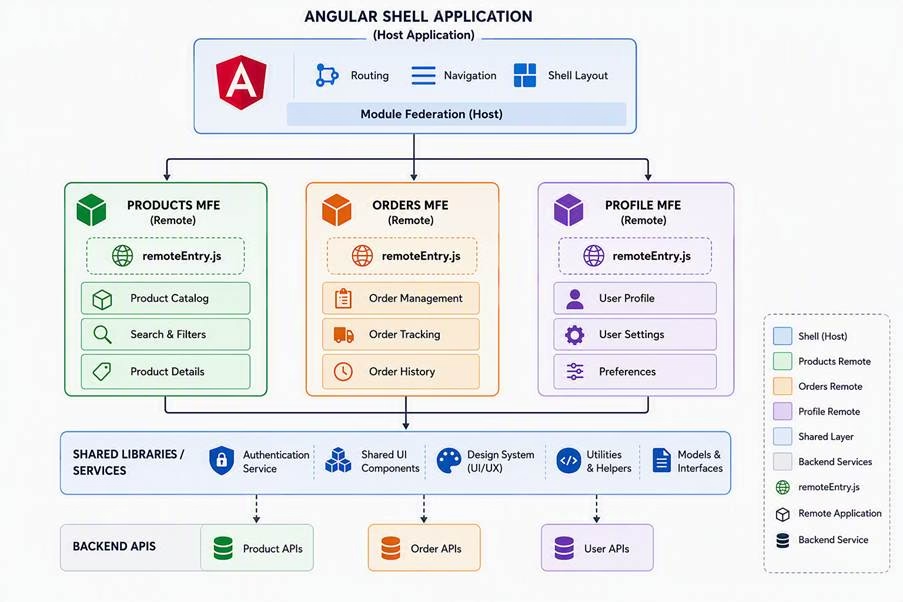
Each remote can have its own:
- Development team
- Source code
- Build pipeline
- Deployment process
- Release cycle
This makes Native Federation particularly useful for large enterprise applications.
How Native Federation Works
Native Federation introduces three main concepts:
1. Host
The host is the shell application which load the remote applications.
example:
Shell Application
|
+---- Product MFE
|
+---- Order MFE
|
+---- Account MFE
2. Remote
A remote is an independently build and deployed micro front end application.
example:
Product MFE
 |
 +-- ProductComponent
 +-- ProductRoutes
 +-- ProductServices
3. Shared Dependencies
Shared components and libraries can be shared across host and remote application with singleton instances .
Examples:
@angular/core
@angular/common
rxjs
Native Federation Architecture
A typical Angular Native Federation architecture looks like this:
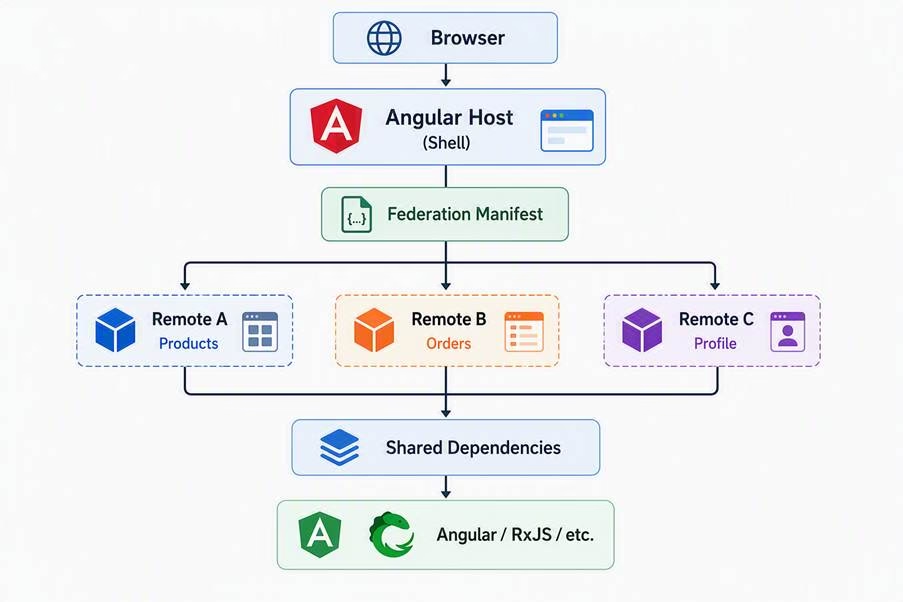
The host searches remote entry information and loads the remote modules at runtime.
Native Federation generates a remote.mjs file which can be used to resolve the remote application at runtime.
Native Federation vs Module Federation
Both is used to solve the micro front end application but there is some difference between these .
| Feature | Module Federation | Native Federation |
| Primary ecosystem | Webpack | Browser standards |
| Module format | Webpack runtime | ES Modules |
| Import Maps | Not central | Core concept |
| Angular esbuild | Requires integration | Designed for it |
| Webpack dependency | Yes | No |
| Runtime loading | Federation runtime | Native federation runtime |
| Independent deployment | Yes | Yes |
| Shared dependencies | Yes | Yes |
| Micro Frontends | Yes | Yes |
| SSR support | Available | Supported |
| Migration from MF | Existing approach | Supported |
Why Use Native Federation?
1. Works With Modern Angular Build Tools
Modern Angular applications uses the esbuild based application builder. Native federation internally integrates this architecture instead of the web pack builder.
2. Uses Web Standards
Native Federation includes:
- ECMAScript modules
- Import maps
- Browser-native module loading
3. Independent Deployment
Remote Applications can be deployed independently.
4. Supports Incremental Migration
We can easily migrate from existing module federation to native federation without any rewrite of the entire architecture.
Native Federation Angular Implementation
We can understand better with example.
Shell Application
|
+---- mfe-product application
The shell will load a Product Micro Frontend.
Step 1: Install Native Federation
For Angular 22 projects, run the command below:
npm install @angular-architects/native-federation --save-devThe adapter version should match the Angular major version. For Angular 20/21, the v4 adapter uses the @angular-architects/native-federation-v4 package.
Step 2: Configure the Remote
Generate a remote application using the below command:
ng g @angular-architects/native-federation:init \ --project mfe-products \ --port 4201 \ --type remoteThe command creates federation-related configuration:
mfe-products/
├── federation.config.mjs

├── tsconfig.federation.json

└── src/

    ├── main.ts

    └── bootstrap.ts
The generated configuration is designed to integrate the Angular application builder with Native Federation.
Step 3: Configure the Remote
A simplified federation.config.mjs can look like:
import { withNativeFederation, shareAll } from '@angular-architects/native federation/config';export default withNativeFederation({
name: 'mfe-products',
exposes: {
'./component: './projects/mfe-products/src/app/app.component.ts'
},
shared: {
...shareAll({
singleton: true,
strictVersion: true,
requiredVersion: 'auto'
})
},
skip: [
'rxjs/ajax',
'rxjs/fetch',
'rxjs/testing'
]
});The important section is exposes.
exposes: {
‘./Component’: ‘./projects/mfe-products/src/app/app.component.ts’
}
This tells native federation that AppComponent can be consumed by other applications.
Step 4: Configure the Angular Host
Generate the shell Application using below command:
ng g @angular-architects/native-federation:init \--project shell \ --port 4200 \ --type dynamic-hostA dynamic host uses a federation manifest to discover remote applications at runtime.
Step 5: Configure federation.manifest.json
The host can contain:
public/
└── federation.manifest.json

Example:

{

  "mfe-products": "http://localhost:4201/remoteEntry.json"

}
This approach is useful because the remote URL can be changed without rebuilding the host.
For example:
Development –> localhost:4201
Testing–> test.example.com/products
Production –> products.example.com
Step 6: Load the Remote
The host can lazy-load the remote using Angular routing feature.
For example:
import { Routes } from '@angular/router';
import { loadRemoteModule } from '@angular-architects/native-federation';

export const routes: Routes = [
  {
    path: 'products',
   loadComponent: () => loadRemoteModule('mfe-products', './Component')
       .then(m => m.AppComponent)
}];
The exact runtime API can vary with the Native Federation adapter version, so projects should follow the API corresponding to their Angular/adapter major version. The current v4 runtime provides initFederation and a compatibility loadRemoteModule API, while generated applications use the orchestrator runtime by default.
Understanding main.ts and bootstrap.ts
One important difference when we use the native federation is bootstrap application
The generated project separates:
main.ts –> Initialize Federation –> bootstrap.ts –> Angular Application
This is important because the federation import map needs to be established before Angular evaluates modules that depend on shared external dependencies.
A simplified setup is:
import { initFederation } from '@angular-architects/native-federation';
initFederation('/assets/federation.manifest.json')
 .then(() => import('./bootstrap'))
  .catch(console.error);
Sharing Angular Dependencies
One of the biggest benefits of federation is dependency sharing.
Without sharing:
Host
├── Angular Core 20 KB
└── RxJS 50 KB
Remote
├── Angular Core 20 KB
└── RxJS 50 KB
The browser may download duplicate dependencies of the shared library.
With shared dependencies:
Shared Dependencies
/ \
/ \
Host Remote
Configuration:
shared: {
..shareAll({
    singleton: true,
    strictVersion: true,
    requiredVersion: 'auto'
  })
}
For Angular applications, singleton sharing is particularly important for libraries such as Angular’s core packages.
Native Federation With SSR and Hydration
Native Federation can also be used with Angular SSR and hydration.
Usages:
- E-commerce applications
- SEO-focused applications
This allows teams to use the micro front end architecture with modern angular rendering using hydration.
Native Federation Production Deployment
Build the applications:
ng build mfe-products –configuration productionand:
ng build shell --configuration productionThe remote’s production output includes the federation entry artifact.
deployment structure can look like:
CDN
|
+– shell/
| ├── index.html
| └── assets/
|
+– products/
├── remoteEntry.json
├── chunks/
└── assets/
The shell’s federation manifest points to the deployed remote.
This means the shell and remote can be deployed independently.
Common Native Federation Problems
1. Version Mismatch
Incorrect Angular versions can cause runtime errors.
Check:
ng versionand make sure the Native Federation adapter major version matches the Angular version.
2. Shared Dependency Conflicts
Be careful when configuring:
singleton: trueDifferent versions of Angular packages can cause runtime problems.such as NG0919 error.
When Should You Use Native Federation?
Native Federation is a strong choice when:
- building a large enterprise Angular application.
- Multiple teams need independent build and deployment.
- When we are using the Angular’s modern Application Builder
- You need SSR/hydration support.
Native Federation vs Traditional Angular Lazy Loading
These concepts are related but different.
| Feature | Angular Lazy Loading | Native Federation |
| Separate deployment | No | Yes |
| Runtime remote application | No | Yes |
| Multiple teams | Limited | Excellent |
| Micro Frontend architecture | No | Yes |
| Shared dependencies | Application-level | Federation-level |
| Independent releases | No | Yes |
Lazy loading is mainly about loading application code later.
Native Federation goes further by allowing that code to belong to an independently built and deployed application.
Conclusion
Native federation solve the micro front end architecture problem with uses of the browser native Es modules and modern Angular build environment.
It uses Es modules , import maps, dynamic load remote application using federation to allow independently deployed application to work together.
For enterprise Angular applications, it can provide:
- Independent deployments
- Runtime remote module loads
- Shared dependencies
- Modern Angular build integration
For organizations already using Module Federation, Native Federation can also provide a gradual migration path rather than requiring a complete rewrite.
Frequently Asked Questions
What is Native Federation in Angular?
Native Federation is a Micro Frontend technology that allows Angular applications to load independently deployed remote applications at runtime using browser-native technologies such as ES modules and import maps.
Is Native Federation better than Module Federation?
Not universally. Native Federation is particularly attractive for modern Angular applications using the esbuild-based Application Builder, while existing Webpack-based systems may continue to benefit from Module Federation.
Does Native Federation replace Module Federation?
It can be an alternative, but organizations can also use both approaches during a gradual migration.
Does Native Federation support Angular SSR?
Yes. Modern Native Federation for Angular supports SSR and Angular hydration capabilities.
Can Native Federation work with Nx?
Yes. Native Federation provides Angular/Nx integration and generators for federation projects.
What is a remote in Native Federation?
A remote is an independently built and deployed application that exposes modules or components that another application can consume.
What is a host in Native Federation?
A host, often called a shell, is the application responsible for loading one or more remote applications.
What is federation.manifest.json?
It is a configuration file that maps remote names to their federation entry URLs, allowing a dynamic host to discover remote applications at runtime.
Is Native Federation suitable for every Angular application?
No. For small applications, standard Angular lazy loading and libraries are usually simpler. Native Federation becomes more valuable when independent teams, deployments, and runtime integration are required.