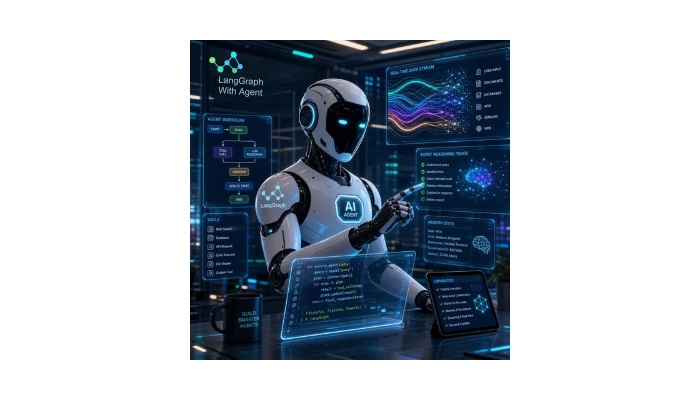
LangGraph AI Agents are used to make the application reliable and stateful in 2026. AI agents can reason through multiple steps , use external tools , maintain state and dynamically decide what action to take next.
LangGraph provides flexible approach for creating such kind of workflows. We can define the agent behaviour using states, nodes, edges while maintaining control over execution.
In this guide, we will learn how to build AI agents using LangGraph , memory, add tools, and understand when LangGraph is better choice for the complex AI Applications.
Table of Contents:
- What Is LangGraph?
- Why Build LangGraph AI Agents in 2026?
- LangGraph AI Agents Architecture
- Build an AI Agent with LangGraph
- Add Tools and Memory
- Human-in-the-Loop AI Agents
- Build Multi-Agent Systems
- LangGraph vs LangChain vs CrewAI
- Best Practices
- Use Cases
- FAQs
- Conclusion
What Is LangGraph?
LangGraph is open-source framework to build the stateful, multi agent, and complex AI workflow. It allows developers to represent an application as a graph containing states, edges, nodes.
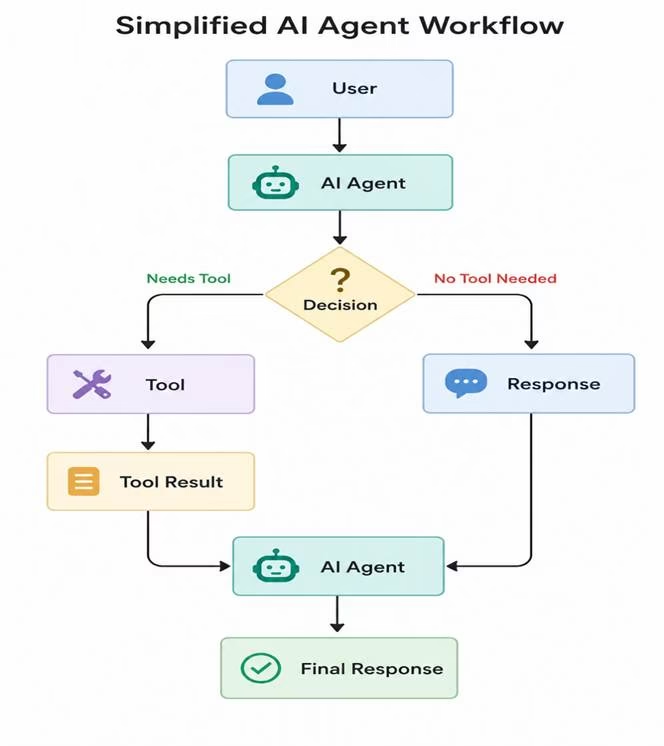
The graph can contain loops to perform the multiple actions until we don’t get the final response.
This makes LangGraph particularly useful for applications that require:
- Stateful conversations
- Tool calling
- Multi-step reasoning
- Human approval
- Persistent memory
- Multi-agent workflows
- Long-running tasks
Why Build LangGraph AI Agents in 2026?
AI application are growing over the time , When modern applications requires the agents that can communicate with external API’s , databases, file systems and other software then langGraph is most important for such applications.
Key advantages include:
| Feature | Benefit |
| State management | Maintains information throughout user sessions. |
| Graph workflows | Supports complex and cyclic processes |
| Tool calling | Allows agents to communicate with the external function or tools |
| Persistence | Enables state to be saved between executions |
| Human-in-the-loop | Allows approval before sensitive actions |
| Multi-agent workflows | Supports specialized agents |
| Streaming | Provides incremental execution results |
For complex workflows where execution control matters, LangGraph provides a more flexible architecture.
LangGraph AI Agents Architecture
it is important to understand the architecture How it works in complex workflows.
A typical agent can contain three major components:
1. State
State contains the information that moves through the workflow.
example:
from typing import TypedDict
class AgentState(TypedDict):
    question: str
    response: str
2. Nodes
Nodes perform individual operations.
A node could:
- Call an LLM
- Execute a tool or external api’s
- Search a database
- Validate information
- Generate a response
3. Edges
Edges determine the workflow what happen next.
example:
Agent → Tool → Agent → ResponseConditional edges can also determine whether the workflow should call a tool or finish execution.
How to Build an AI Agent with LangGraph
Install the required packages:
pip install -U langgraph langchainNext, create a simple state structure:
from typing import TypedDict

class AgentState(TypedDict):
   message: str
You can then create a node that processes the state:
def agent_node(state: AgentState):
return {
    "message": f"Processing: {state['message']}"
    }
The node can be connected to a graph:
from langgraph.graph import StateGraph, START, END
builder = StateGraph(AgentState)

builder.add_node("agent", agent_node)

builder.add_edge(START, "agent")

builder.add_edge("agent", END)

graph = builder.compile()
Run the workflow:
result = graph.invoke({
"message": "Explain AI agents"
})
print(result);
This basic example demonstrates the core idea behind LangGraph: application state moves through nodes connected by edges.
The agent node can call an LLM and decide whether additional action are required or not for production applications.
Adding Tools to LangGraph AI Agents
An AI agent becomes more useful when it can interact with external tools.
Common tools include:
- Web search
- Calculator
- Weather APIs
- Databases
- REST APIs
- File systems
- Internal business services
For example, an agent could receive:
“What is the weather and temperature currently in Delhi?”
The agent can determine that weather tool is required to get the response or not.
The workflow becomes:
User Question
↓
Agent
↓
Need Tool?
↙ ↘
Yes No
↓ ↓
Weather Answer
↓
Result
↓
Agent
↓
Final Answer
Adding Memory to LangGraph
Memory allows an agent to keep the context and information while we do interaction
Without memory:
Question 1 → ResponseQuestion 2 → ResponseWith state and persistence:
Question 1
↓
State
↓
Question 2
↓
Previous State + New Question
↓
Response
Memory is useful for :
- Chatbot agents
- Personal assistants
- Research agents
- Coding assistants
- Long-running tasks
Human-in-the-Loop AI Agents
Agent requires the approval of human in the sensitive information before execution.
For example, an AI agent may prepare a refund but should not execute it until a human approves the transaction.
A safer workflow is:
User
↓
AI Agent
↓
Prepare Action
↓
Human Approval
↓
Execute Tool
↓
Final Response
Human-in-the-loop workflows are useful for financial operations, account changes, production deployments, and other sensitive business processes.
Building Multi-Agent Systems with LangGraph
A complex application requires the multiple agents for execution of the workflow.
You can create multiple specialized agents.
For example:
Supervisor
/ | \
/ | \
Researcher Coder Writer
\ | /
\ | /
Reviewer
↓
Response
Research agent will collect the information and requirements , coding agent can implement the requirement , reviewer can validate the results and implementation.
This architecture is known as a multi-agent system.
LangGraph vs LangChain
LangGraph and LangChain are related but serve different purposes.
| Feature | LangChain | LangGraph |
| Abstraction | Higher-level | Lower-level |
| Simple agents | Excellent | Excellent |
| Complex workflows | Good | Excellent |
| State control | Good | Excellent |
| Cyclic workflows | Limited | Excellent |
| Human-in-the-loop | Supported | Strong |
| Multi-agent workflows | Supported | Strong |
| Workflow customization | Good | Excellent |
If your application requires detailed control over state, execution, branching, persistence, or complex workflows, LangGraph is a strong option.
LangGraph vs CrewAI
Both frameworks can be used to build AI agent systems, but their approaches differ.
LangGraph focuses on graph based workflow and state management.
CrewAI focuses on role-based agent collaboration and task delegation.
Choose LangGraph when you need detailed workflow control. Consider CrewAI when your application naturally maps to a team of specialized agents.
Common Use Cases
LangGraph can be used for many AI applications, including:
- AI customer-support agents
- Research assistants
- Coding agents
- Data-analysis agents
- Document-processing workflows
- Business automation
- Personal assistants
- Multi-agent applications
- RAG applications
- AI workflow automation
For example, a customer-support agent could retrieve customer information, search a knowledge base, determine the appropriate response, and escalate the conversation to a human when necessary.
Frequently Asked Questions
What is LangGraph used for?
LangGraph is used to build stateful, controllable AI workflows and agents that can perform multiple steps, use tools, maintain state, and interact with humans.
Is LangGraph good for AI agents?
Yes. LangGraph is particularly useful when an AI agent needs state management, conditional workflows, persistence, tool calling, or human-in-the-loop execution.
Is LangGraph better than LangChain?
Neither is universally better. LangChain provides higher-level abstractions, while LangGraph gives developers more control over complex and stateful workflows.
Can LangGraph build multi-agent systems?
Yes. LangGraph can coordinate multiple specialized agents through graph-based workflows.
Is LangGraph suitable for production?
LangGraph is designed for production-oriented agent workflows where developers need control over state, persistence, execution, and deployment.
Does LangGraph support memory?
Yes. LangGraph supports state persistence and checkpointing, which can be used to implement conversational and long-running agent memory.
Conclusion
LangGraph AI Agents provides a powerful way to build stateful , detail level control , and scalable AI applications in 2026.LangGraph allows to create workflows where agent can call tools, maintain state , human approval , and coordinate with other agents.
As AI applications become more autonomous, understanding graph-based agent orchestration can help developers build systems that are easier to control, test, monitor, and scale.
hi