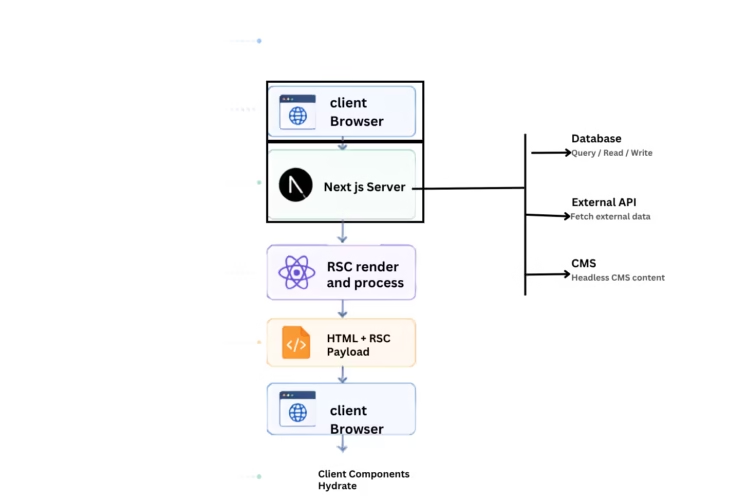
React is growing faster over the years, introducing powerful features that can improve the developer experience and web application performance. One of the biggest innovations is React Server Components. It is same like traditional react components that execute in the browser, react server components executes on the server and send the UI to the client. This approach improves the page load speed, reduces the JavaScript bundle size.
If you’re building modern applications with next.js, understanding React Server components is crucial. In this guide you’ll learn how they work, when to use , their benefits and examples.
Table of Contents
- What are React Server Components?
- How React Server Components Work
- Server Components vs Client Components
- Practical Example
- Best Practices
- Frequently Asked Questions
- Conclusion
What are React Server Components?
React Server Components are just like traditional react components only difference is that it runs on the server side. Server processes the component, fetch the required data and sends the HTML along with payload to the client.
React Server Components reduce the amount of Javascript downloaded by the browser and improves the performance of the applications. It also improves the page load speed in the browser because html process in the server.
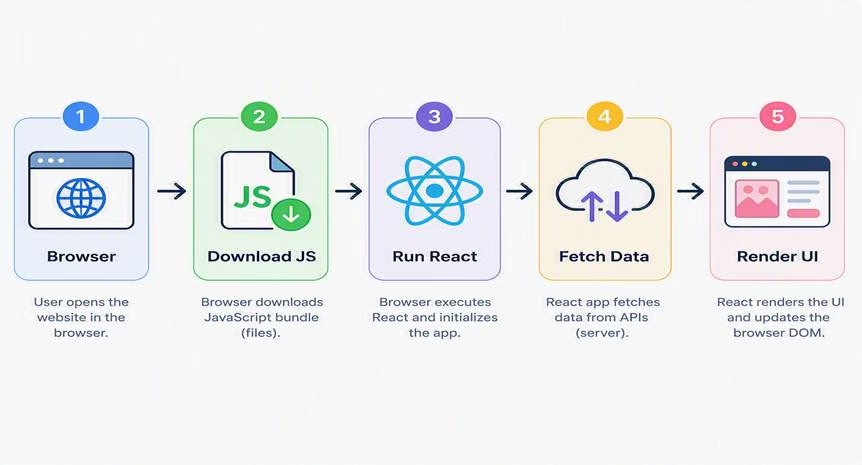
Traditional Client Rendering
React Server Components
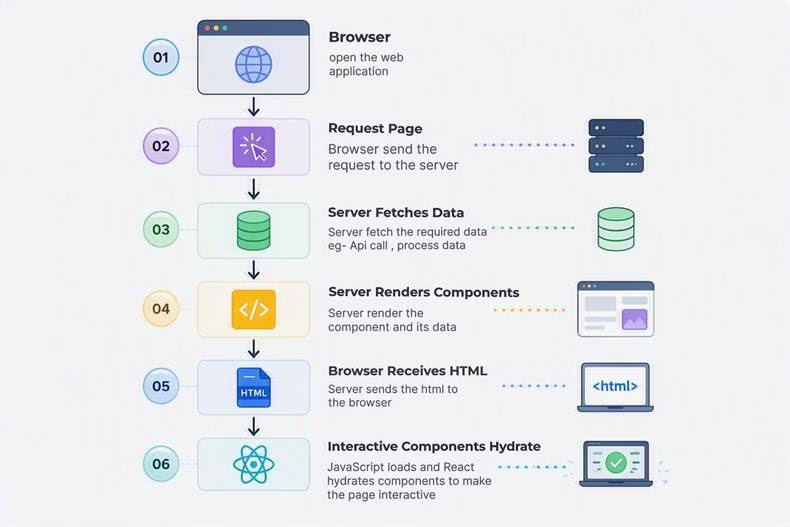
With React Server Components, users see content much faster because rendering happens before the page reaches the browser.
How React Server Components Work
The rendering lifecycle follows these steps:
- A user request a page to the server
- The server receives the request.
- The Server Component fetches data from APIs or databases or external APIs.
- React renders the component and html on the server.
- HTML and an RSC payload are sent to the browser.
- The browser displays the page immediately.
- Interactive Client Components are hydrated.
Architecture
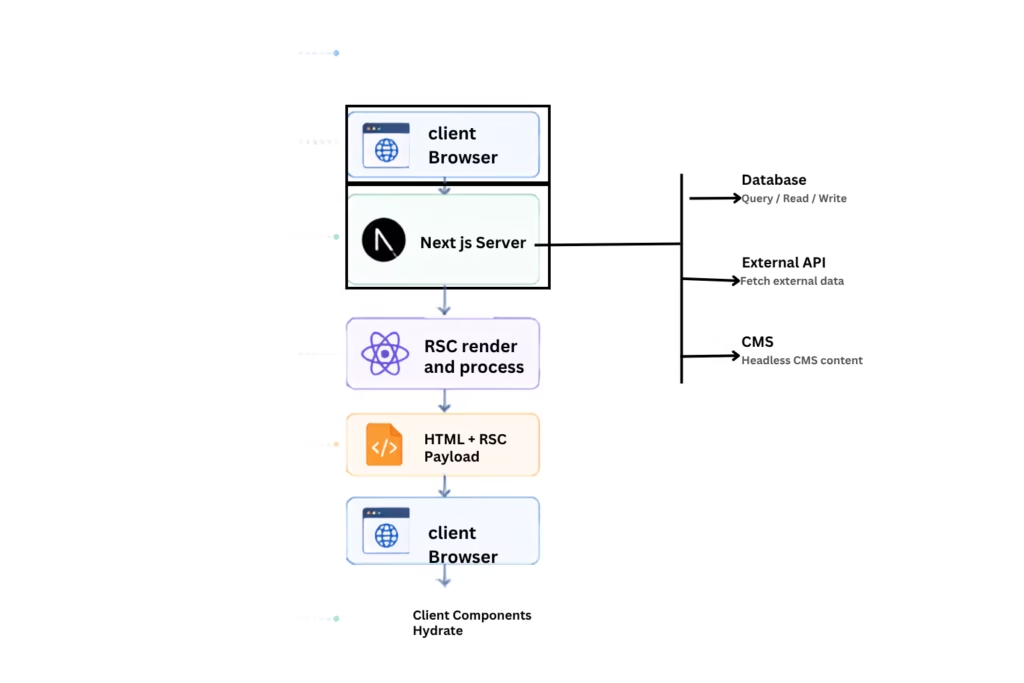
This improves the rendering of the page because heavy computation handles on the server side.
Server Components vs Client Components
| Feature | Server Component | Client Component |
| Runs on Server | Yes | No |
| Runs in Browser | No | Yes |
| Supports Event Handlers | No | Yes |
| Can Access Database | Yes | No |
| JavaScript Sent to Browser | Minimal | Required |
| Best For | Static content, data fetching | Interactive UI |
Server Components is use for displaying the content and featching data, while client components is use for the user interactions like form, button, and animations.
Practical Example
Imagine you’re building an e-commerce website.
Server Component
async function getProductsDetails() {
const responseData = await fetch("https://dummyjson.com/productsdetails");
return response.json();
}

export default async function ProductsRenderPage() {
    const productData = await getProducts();
    return (
       <div>
      { productData.products.map(product => (
        <h2 key={product.id}>
          {product.title}
        </h2>
        ))}
      </div>
  );
}
Notice that the data is fetched directly on the server. There’s no need for useEffect or loading states for the initial page load.
Client Component
'use client';
export default function AddProdcutToCart() {
  return (
    <button onClick={() => alert('Product is added!')}>
      Add to Cart
    </button>
  );
}
The “use client” directive tells React that this component should execute in the browser because it contains an event handler.
Benefits of React Server Components
React Server Components offers several advantages:
- Faster page loading.
- Reduce the heavy computation on the client side
- Smaller JavaScript bundles.
- Better SEO because HTML is rendered on the server.
- Improved Core Web Vitals.
- Direct access to databases and backend services.
- Reduced client-side API calls.
- Improve the application performance
Best Practices
Follow these best practices when using React Server Components:
- Use Server Components by default to improve the performance.
- Create Client Components only when user interaction is required.
- Keep computation and business logic in the server.
- Use Suspense component for loading states for better user experience.
- Avoid sending unnecessary JavaScript bundle to the client.
- Separate server and client responsibilities clearly.
Frequently Asked Questions
1. What are React Server Components?
React Server Components are components that render on the server and send pre-rendered UI to the browser, reducing JavaScript bundle size and improving performance.
2. Do React Server Components replace Client Components?
No. Server Components and Client Components work together. Server Components render static content, while Client Components handle user interactions.
3. Can Server Components use useState?
No. Hooks like useState, useEffect, and browser APIs are only available in Client Components.
4. Do React Server Components improve SEO?
Yes. Since HTML is generated on the server, search engines can index content more efficiently, improving SEO.
5. Can Server Components access a database directly?
Yes. Server Components can communicate directly with databases, APIs, and backend services without exposing sensitive logic to the client.
6. When should I use Client Components?
Use Client Components for interactive features such as forms, buttons, modals, animations, and components that require browser APIs.
7. Are React Server Components only available in Next.js?
React Server Components are supported by React, but Next.js App Router provides the most mature and production-ready implementation.
8. Do Server Components reduce JavaScript bundle size?
Yes. Because Server Components do not execute in the browser, they are excluded from the client-side JavaScript bundle.
Conclusion
React Server Components growing rapidly for modern react application. Data fetching and rendering in server side significantly improve the page load speed, reduce JS bundle size, and give the better user experience. We can use both client and server component in application.
For modern react applications with Next.js – adopting react server components is the best practice. By understanding core concept of react server component you can build scalable , secure and high-performance applications that are ready for production.