HTTP request in react is a core concept for building web applications. We can fetch or send data from an API in front end through a backend, understanding sending HTTP request in React is essential for every developer. We can connect backend API from the front end via the JavaScript API. HTTP connection should be secure whenever we send or retrieve the data into the backend .
In this guide, you’ll learn how React communicates with servers, how databases are connected via APIs, and best practices for production-ready apps. Also, we will see the examples with code.
📌 Table of Contents
- What is sending HTTP request in React
- Why React needs a backend
- How data flows from database to UI
- Methods to send requests
- Examples using fetch and axios
- Best practices
What is Sending HTTP Request in React?
Sending HTTP request in React means communicating with a backend server to retrieve or send data into the Front-end. There are many methods in the HTTP Request like GET,POST,PUT,PATCH,DELETE. These method takes the parameter and send the http request to the backend with the specific API Endpoint.
Common HTTP Methods:
- GET → Fetch data
- POST → Send data
- PUT → Update data
- DELETE → Remove data
- PATCH → Update data
Example:
get(‘api endpoint URL’, HttpOptions){
    // business logic
}
post(‘api endpoint URL’, requestBody,httpOptions){
// business logic
}🧠 Why React Cannot Connect Directly to Database?
While learning sending HTTP request in React, it’s important to know:
❌ React should NOT directly connect to a database.
✅ React communicates through APIs (microservices)
Architecture Flow:
React (client side) → Backend API → Database
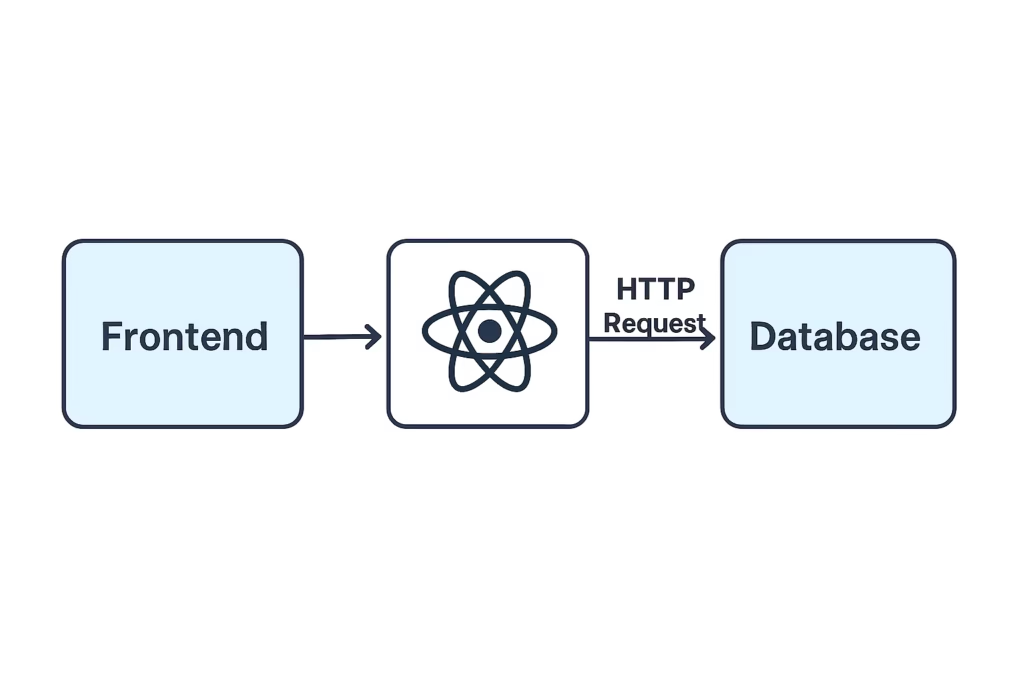
This ensures:
- Security
- Scalability
- Better data management
- Modularity
🔄 Data Flow: React to Database
We will see how it is working behind the scene while sending the http request from front end to backend:
- User interacts with UI via the actions like buttons , events.
- React sends HTTP request with secured channel or call the backend API
- Backend processes request and get or send the data to database
- Database returns data to the Api
- React updates UI based on the Api response.
🔥 Example: Sending HTTP Request in React using Fetch
import { useEffect, useState } from 'react';

  function App() {
   const [data, setData] = useState([]);
   useEffect(() => {
    fetch('https://api.example.com/usersData')
      .then(res => res.json())
      .then(data => setData(data));
  }, []);
return (
    <div>
      {data.map(user => (
        <span key={user.id}>{user.name}</span>
      ))}
    </div>
  );
}
🔥 Example: Sending HTTP Request in React using Axios
npm install axios
import axios from 'axios';
import { useEffect, useState } from 'react';

function App() {

  const [data, setUserData] = useState([]);

  useEffect(() => {

    axios.get('https://api.example.com/usersData')

      .then(res => setUserData(res.data));

  }, []);

  return <div>{data.length} Users</div>;

}
⚙️ Backend Example (Node.js + Express)
const express = require('express');
const app = express();

app.get('/usersData', (req, res) => {

  res.json([{ id: 1, name: 'John',age:32 }]);

});

app.listen(5000);
React connects to this API, not directly to database. This ensure the connection is secured and system is scalable.
📊 Tool Comparison (Sending HTTP Request in React)
| Tool | Best For | Ease of Use | Performance |
| Fetch | Native API | Easy | High |
| Axios | Advanced requests | Very Easy | High |
| React Query | Data fetching | Very Easy | High |
| SWR | Caching | Easy | High |
🚀 Best Practices
- Use environment variables for API URLs so it will fetch the api according to the environment variables (PROD, DEV,QA etc)
- Handle loading and error states
- Use HTTPS for secure conenction
- Avoid exposing sensitive data like token or user information or password.
- Try to avoid the library for the API end point call.
⚠️ Common Mistakes
- Direct DB connection from React Front end
- Not handling errors
- Over-fetching data
- Ignoring cleanup in useEffect (memory leaks)
- Loading or pending state not handled properly
📈 Advanced Concept
POST Request Example
fetch('https://api.example.user.com/usersData', {
  method: 'POST',
  headers: { 'Content-Type':      'application/json',token:’AUTHORIZATION’
  },
 body: JSON.stringify({ name: 'Test Data' })
}).then(res=>res.json()).then((res)=>console.log(res);
✅ Conclusion
Sending HTTP request in React is the backbone of full-stack applications. By understanding API communication and backend integration, you can build powerful and scalable apps. We should keep in mind that API response should be fast so that our application waiting time will be reduce. It will improve the performance of the applications.
❓ FAQs
Can React connect directly to database?
No, it must go through backend APIs.
Which is better: fetch or axios?
Axios is easier, fetch is built-in.
What is API in React?
A communication channel between frontend and backend.
How to secure API calls?
Use authentication and HTTPS.
🔥 Final Thoughts
You can become professional full stack developer if you know how to send the http request in react and it’s working behind the scene.🚀. It will help you to build the real world applications. It is core concept of the web application to communicate with backend server. So learn it and implement in application.