
The useContext and useReducer hooks are powerful tools in React for managing global and complex state without external libraries. If you want scalable state management, mastering useContext and useReducer is essential. With the help of these features we can manage state at application level.
In this guide, you’ll learn how these hooks work together, see real examples, and compare them with other tools.
📌 Table of Contents
- What is useContext
- What is useReducer
- How they work together
- Examples
- Tool comparison
- Best practices
What is useContext in React?
The useContext and useReducer combination starts with useContext.
It allows you to:
- Share state globally
- Avoid prop drilling
- Access data anywhere in the component tree
- Component will be decoupled from another component
- Component will be reusable
What is useReducer in React?
The second part of useContext and useReducer is useReducer.
It is used for:
- Complex state logic
- Predictable state updates
- Managing multiple actions
- To separate state management from rendering logic to improve testability and readability
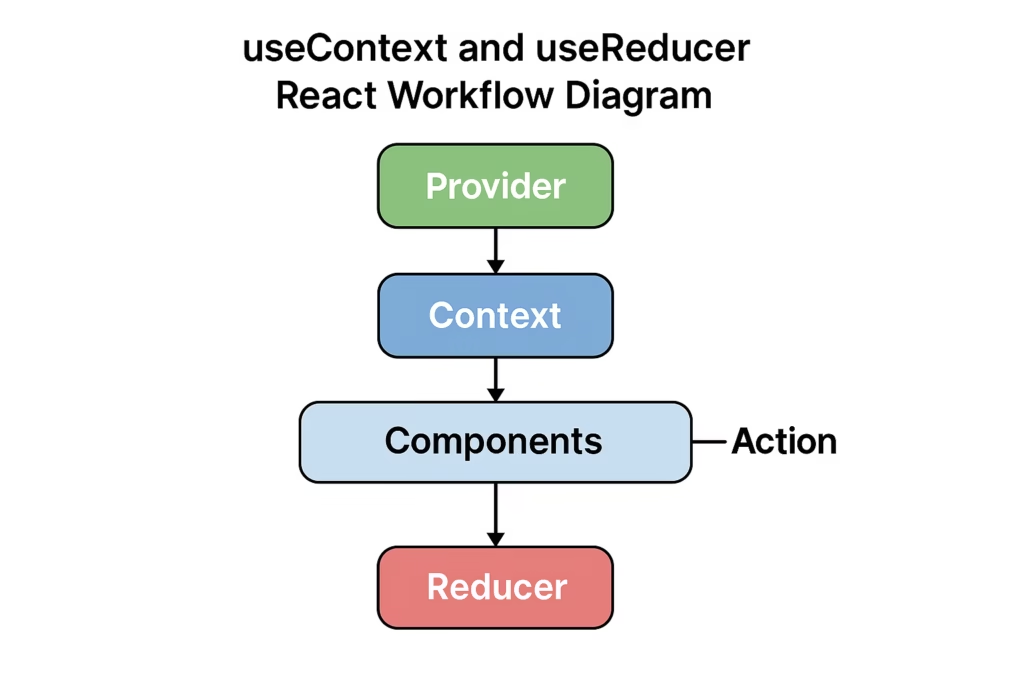
🔥 Example: useContext and useReducer (Global Counter)
Step 1: Create Context
import { createContext } from 'react';
export const CounterContext = createContext({‘counter:0 });
Step 2: Create Reducer
const reducer = (state, action) => {
switch (action.type) {
     case 'increment':
         return { count: state.count + 1 };
    case 'decrement':
         return { count: state.count - 1 };
    default:
        return state;
    }
};
Step 3: Create Provider
import { useReducer } from 'react';
export const CounterProvider = ({ children }) => {
   const [state, dispatch] = useReducer(reducer, { count: 0 });
    return (
         <CounterContext.Provider value={{ state, dispatch }}>              {children}
    </CounterContext.Provider>
  );
};
Step 4: Use in Component
import { useContext } from 'react';
import { CounterContext } from './context';

const Counter = () => {
   const { state, dispatch } = useContext(CounterContext);
   return (
         <>
         <h2>{state.count}</h2>
        <button onClick={() => dispatch({ type: 'increment' })}>+
        </button>
      <button onClick={() => dispatch({ type: 'decrement' })}>-              </button>
    </>
  );
};
📊 Tool Comparison (useContext and useReducer vs Others)
| Tool | Best For | Complexity | Performance |
| useContext + useReducer | Global state | Medium | High |
| Redux | Large apps | High | High |
| Zustand | Simple state | Low | High |
| Recoil | Fine-grained state | Medium | High |
Comparison: useState vs. useReducer
| Feature | useState | useReducer |
| Complexity | Best for simple, independent values. | Best for complex, interdependent state. |
| Logic Location | State updates are usually inside event handlers. | Logic is centralized in a separate reducer function. |
| Re-renders | Component Re-renders on every state update. It will update the UI every time once state is updated. | Can batch updates and avoid unnecessary re-renders in some cases. |
🚀 When to Use useContext and useReducer
Use useContext and useReducer when:
- App has moderate complexity
- You want Redux-like pattern without library
- Need global state sharing
⚡ Benefits of useContext and useReducer
- No external dependency
- Clean architecture
- Clean component and reusable
- Scalable state management
- Easy debugging
⚠️ Limitations
- Not ideal for very large apps
- Performance issues if overused
- Boilerplate code
📈 Best Practices
- Split context for performance
- Use memoization
- Avoid unnecessary re-renders
- Keep reducer pure
✅ Conclusion
The useContext and useReducer combination is one of the best ways to manage state in React without external libraries. It provides a clean and scalable solution for modern applications. With these features we can create highly optimized Applications also.
If you’re building medium-scale apps, this approach is highly recommended.
❓ FAQs
What is useContext used for?
To share global state across components.
Why use useReducer?
For managing complex state logic.
Is it better than Redux?
For small to medium apps, yes.
Can I use both together?
Yes, they work best when combined.
🔥 Final Thoughts
Mastering useContext and useReducer will make you a better React developer and help you build scalable,optimized applications efficiently. 🚀
http://www.pilotenboard.de/viewtopic.php?p=441099#441099