Handling Side Effect in React is a crucial skill for building modern web applications. Whether you are calling backend APIs, managing timers, or handling DOM manipulation , mastering handling side effect in React using the useEffect hook is essential technique.
In this guide, you will learn how to properly handle side effects, avoid common mistakes, and use useEffect effectively in react applications.
📌 Table of Contents
- What is side effect in React
- Understanding useEffect
- How useEffect works
- Practical examples
- Best practices
- Tool comparison
What is Side Effect in React?
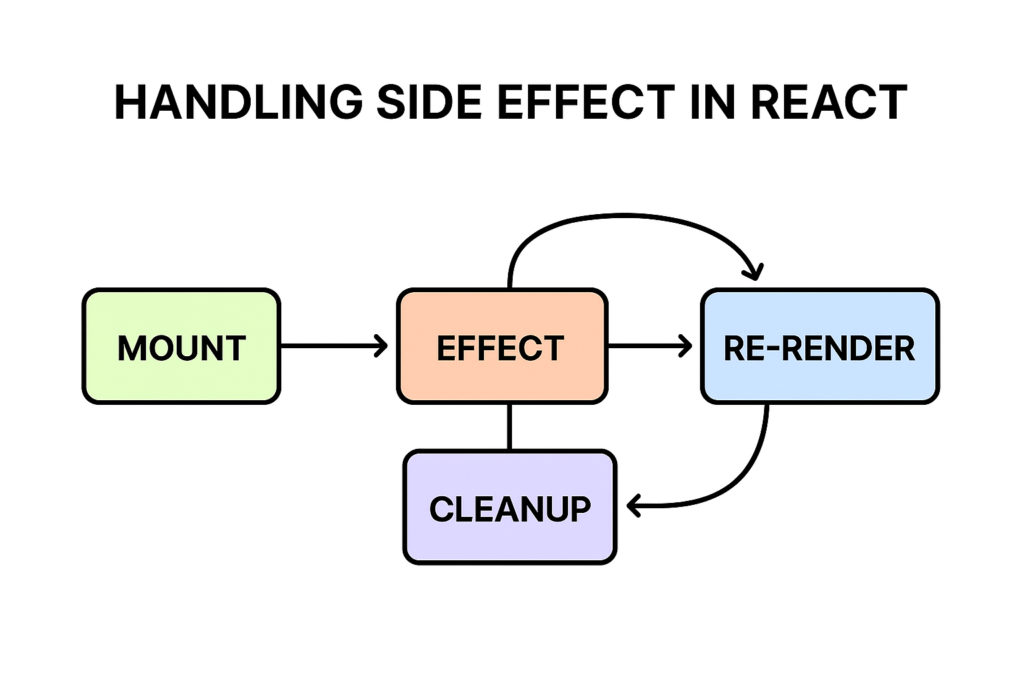
Side Effect in React refers to managing operations that interact outside the component. This operation is not direct dependent on the DOM elements.
Examples of Side Effects:
- API calls
- Event listeners
- Timers (setTimeout, setInterval)
- DOM manipulation
These actions do not directly return UI but affect application behaviour.
🧠 Understanding useEffect for Handling Side Effect in React
The useEffect hook is the main tool for handling side effect in React. It is called after the react component execution completed.
Syntax:
useEffect(() => {
// side effect logic

}, [dependencies]);
It runs after the component return the jsx and can also clean up previous effects.
🔄 How useEffect Works
While handling side effect in React, understanding dependency behavior is important.
- [] → Run once (on mount)
- [value] → Run first time after the component return html as well as when dependency value changes
- No dependency → Run on every render so it will go into the infinite loop if state is update.
🔥 Example 1: API Call (Handling Side Effect in React)
import { useEffect, useState } from 'react';

function App() {
const [data, setData] = useState([]);\
  useEffect(() => {
    fetch('https://jsonplaceholder.typicode.com/posts')
    .then(res => res.json())
    .then(data => setData(data));

  }, []);

  return <h2>{data.length} Posts Loaded</h2>;
}
This is one of the most common patterns for handling side effect in React.
🔥 Example 2: Timer Effect
useEffect(() => {
const timer = setInterval(() => {

    console.log('Running...');

  }, 1000);

  return () => clearInterval(timer);

}, []);
Timers must always be cleaned up to avoid memory leaks.
🔥 Example 3: Event Listener
useEffect(() => {
const handleResize = () => console.log(window.innerWidth);

  window.addEventListener('resize', handleResize);

  return () => window.removeEventListener('resize', handleResize);

}, []);
🧹 Cleanup Function in Side Effect in React
Cleanup is essential for proper handling side effect in React. Otherwise it will slow the component performance and web application. Because it will trigger every time once component is mounted. This prevents memory leak also.
useEffect(() => {
return () => {
   console.log('Cleanup executed');
  };

}, []);
This ensures no unnecessary memory usage.
📊 Tool Comparison (Handling Side Effect in React)
| Tool/Hook | Best Use Case | Complexity | Performance |
| useEffect | Side effects | Medium | High |
| useLayoutEffect | DOM updates | High | High |
| React Query | Data fetching | Low | High |
| Redux Thunk | Async logic | High | Medium |
🚀 Best Practices for Handling Side Effect in React
- Always define dependencies
- Use cleanup functions
- Avoid unnecessary re-renders
- Split logic into multiple effects
⚠️ Common Mistakes
- Missing dependency array
- Infinite loops
- Not cleaning up effects
- Overusing useEffect
📈 Advanced Pattern
Conditional Effect
useEffect(() => {
  if (user) {
console.log('User logged in');
  }

}, [user]);
Here we have included the dependencies of the user object.so it will trigger once the user value is changed.
✅ Conclusion
Handling side effect in React becomes simple and powerful when using useEffect correctly. By following best practices and understanding lifecycle behavior, you can build efficient and scalable React applications. It will improve the performance of the component and web applications.
❓ FAQs
What is handling side effect in React?
Managing operations like API calls and event listeners.
Why use useEffect?
To handle side effects in functional components.
What is cleanup?
Removing side effects to prevent memory leaks.
Can useEffect run multiple times?
Yes, based on dependencies.
🔥 Final Thoughts
Mastering handling side effect in React will help you write cleaner code, avoid bugs, and improve application performance in modern React development 🚀
[…] useEffect […]