The AWS CI/CD pipeline is a modern approach to automate software/product delivery, enabling developers to build code, test, and deploy applications faster and more reliably. With CI/CD development and deployment happen simultaneously, making product delivery fast and efficient. If you’re working on cloud-based applications, learning an AWS CI/CD pipeline is essential for efficient DevOps practices.
In this guide, you’ll learn how the AWS CI/CD pipeline works, its components, real-world workflow, and best practices with examples.
📌 Table of Contents
- What is AWS CI/CD pipeline
- Key services in AWS CI/CD
- How the pipeline works
- Step-by-step setup
- Tools comparison
- Benefits and challenges
What is AWS CI/CD Pipeline?
An AWS CI/CD pipeline is a set of automated task that allow developers to:
- Continuously integrate code changes
- Automatically test applications
- Continuous Deployment updates to production
It will help to developer for better code quality and improve the productivity. With use of this delivery of the product can be achieve timely and easily.
CI = Continuous Integration
CD = Continuous Delivery/Deployment
🧠 Key Services in AWS CI/CD Pipeline
The AWS CI/CD pipeline uses multiple AWS services:
1. AWS CodePipeline
- Orchestrates the pipeline there is many stages defined like build , test, deployment,
- Automates workflow
- Sonar test case also we can run in pipeline with configure.
2. AWS CodeBuild
- Compiles and run tests code
- Runs build of the application
CodeBuild is the main component of the pipeline. It will execute the yaml where set of commands executes and build the application code.
3. AWS CodeDeploy
- Deploys applications
- Supports rolling updates
CodeDeploy component is the used for the deployment of the code and store into the s3 bucket.
4. AWS S3
- Stores artifacts into the particular folder or path
- Store the build object
5. AWS IAM
- Manages permissions and security , user Role, groups
🔄 How AWS CI/CD Pipeline Works
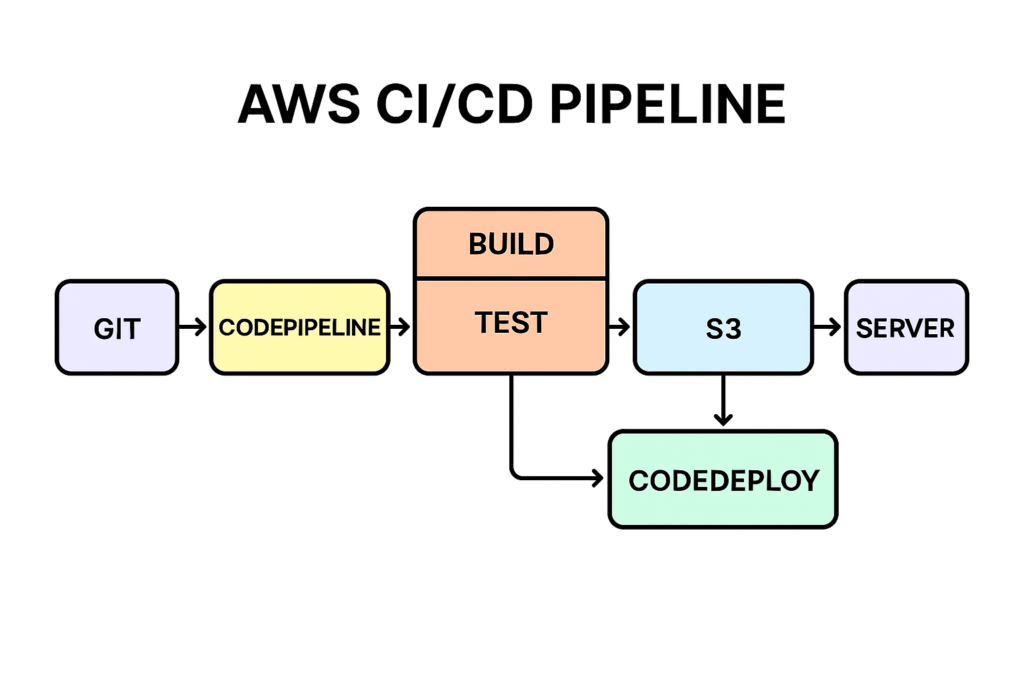
The AWS CI/CD pipeline follows a structured workflow:
- Developer pushes code to repository
- Pipeline detects changes from that specific branch and run the codebuild
- CodeBuild compiles and run test cases
- Artifacts are stored in S3 bucket
- CodeDeploy deploys application
- Application goes live where it will fetch the latest build object.
How can AWS support your CI/CD pipeline needs?
A CI/CD pipeline enables businesses to produce, test, and release application updates more quickly without compromising software quality and security. Software development teams modify code, merge changes, automate tests, schedule deployment, and more with automated CI/CD tools. However, some teams face challenges in scaling CI/CD workflows due to infrastructural, resource, and process limitations.
AWS provides a suite of cloud-based solutions to create, streamline, and scale your CI/CD pipeline.
- AWS CloudFormation provisions resources that CI/CD tools run on.
- AWS Cloud9 allows developers to write, run, and debug code from their browser.
- AWS CodeBuild allows you to compile, test, and pack your application without managing your own build servers.
- AWS CodeDeploy automates deployment on any environment, including on-premise and AWS instances.
- AWS CodePipeline lets you model the entire CI/CD workflow, from source to live production environment.
- AWS CloudWatch allows operational teams to continuously monitor, log and analyze deployed applications.
🔥 Example Workflow of AWS CI/CD Pipeline
Scenario:
You push code to GitHub source.
Pipeline Flow:
- GitHub → triggers CodePipeline → codebuild
- CodeBuild → runs tests cases
- S3 → stores build output
- CodeDeploy → deploys to EC2 instance to run the application
📊 Tools Comparison (AWS CI/CD Pipeline vs Others)
| Tool | Best For | Complexity | Integration |
| AWS CI/CD | Cloud-native apps | Medium | Excellent |
| Jenkins | Custom pipelines | High | Flexible |
| GitHub Actions | GitHub projects | Low | Good |
| GitLab CI/CD | DevOps platform | Medium | Strong |
🚀 Step-by-Step Setup of AWS CI/CD Pipeline
Step 1: Create Repository
Use GitHub or AWS CodeCommit
Step 2: Create CodeBuild Project
- Define buildspec.yml (test case command and compiling steps)
- Configure environment and pass the environment variables in codbuild.
Step 3: Setup CodePipeline
- Connect source like github ,aws
- Add build and test stage
- Add deploy stage
You can add multiple stages into the pipeline.
Step 4: Configure Deployment
Use CodeDeploy or ECS
Step 5: Test Pipeline
Push code and monitor pipeline execution and workflow
⚡ Benefits of AWS CI/CD Pipeline
- Faster deployments
- Reduced manual errors
- Automated testing
- Scalable infrastructure
- Faster productivity
- Automation the workflows
⚠️ Challenges
- Initial setup complexity
- Costing
- Learning curve
📈 Best Practices
- Use infrastructure as code
- Automate testing
- Monitor pipeline performance
- Defined the IAM roles, permission and user group for the security
🧠 When to Use AWS CI/CD Pipeline
Use AWS CI/CD pipeline when:
- Deploying application into cloud
- Working with microservices where each service is independent.
- Need automated DevOps workflows
✅ Conclusion
The AWS CI/CD pipeline is a powerful solution for automating software delivery. By using AWS services like CodePipeline, CodeBuild, and CodeDeploy, teams can achieve faster, reliable, and scalable deployments. Hence it will allow to developer for better code quality and faster productivity.
❓ FAQs
What is AWS CI/CD pipeline?
It automates build, test, and deployment processes.
Which AWS service is used for CI/CD?
CodePipeline, CodeBuild, and CodeDeploy.
Is AWS CI/CD free?
Some services have free tiers, but usage costs apply.
Why use CI/CD?
To speed up development and reduce errors.
🔥 Final Thoughts
Implementing an AWS CI/CD pipeline can significantly improve your development workflow and help you deliver high-quality software faster. However it is not open source we have to take subscriptions for the AWS. But it will be enhance the security and automate the taks to deploy the application into the cloud.